
An adventurous soulsborne action game in a dark fantasy world from the creators of the Dark Souls series, featuring the author of "Game of Thrones". The focus is on... Read more
Level 125, Boss Battle Readiness from DLC

-
Download (2.34 MB)July 7, 2024, 03:54 AMuroven-125-gotovnost-k-bitve-s-bossami_1720313654_143287.zip
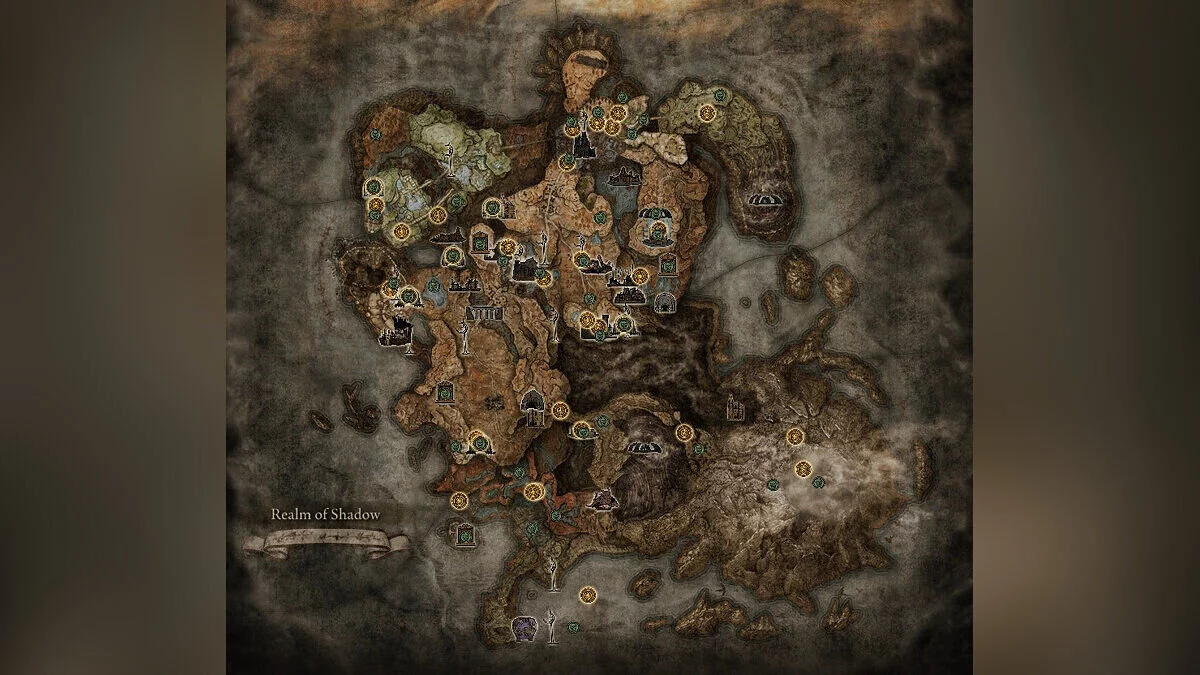
40 out of 43 DLC bosses are marked and ready for battle, except for the final boss and two others that have already been defeated to unlock most of the map. The closest locations to the bosses are also unlocked for fast travel.
How to launch:
- create a backup of the current save file (please do not skip this step. If you have trouble finding and backing up the save file, additional instructions are provided below);
- download and unpack the save template;
- download and unpack the EldenRingSaveCopier program by BenGrn to any convenient location on your computer;
- run the EldenRingSaveCopier.exe file;
- on the left side of the window, where it says Source File, click the browse button, then find and select the save template you just downloaded;
- on the right side, where it says Destination File, click the browse button, then find and select the save file you want to overwrite (see additional instructions for the target folder location);
- play.
Additional instructions:
- for steps 1 and 6, copy and paste this into the explorer: C:/Users/username/AppData/Roaming/EldenRing;
- upon opening the folder location, you will notice that there is a numbered folder (some may contain multiple numbered folders), but this does not matter much;
- the main thing is that you find the folder with the number containing the file named ER0000.sl2, because this is your save file;
- for step 1, copy and paste ER0000.sl2 somewhere on your computer to make a backup;
- for step 6, overwrite ER0000.sl2. A backup must be made before overwriting so that in case of malfunction and/or corruption of the save file, you can revert to the old save file.
40 из 43 боссов DLC отмечены и готовы к сражению, за исключением финального босса и двух других, которые уже были убиты, чтобы открыть большую часть карты. Ближайшие к боссам места Грейс также разблокированы для быстрого перемещения.
Как запустить:
- создайте резервную копию текущего файла сохранения (пожалуйста, не пропускайте этот шаг. Если у вас возникли проблемы с поиском и резервным копированием файла сохранения, дополнительные инструкции приведены ниже);
- скачайте и распакуйте шаблон сохранения;
- скачайте и распакуйте программу EldenRingSaveCopier от BenGrn в любое удобное для вас место на вашем компьютере;
- запустите файл EldenRingSaveCopier.exe;
- в левой части окна, где указано Source File, нажмите кнопку browse, затем найдите и выберите шаблон сохранения, который вы только что загрузили;
- в правой части, где указано Destination FIle, нажмите кнопку browse, затем найдите и выберите файл сохранения, который вы хотите перезаписать (см. дополнительные инструкции по расположению целевой папки);
- играйте.
Дополнительные инструкции:
- для шагов 1 и 6, скопируйте и вставьте это в проводник: C:/Users/username/AppData/Roaming/EldenRing;
- открыв расположение папки, вы заметите, что там есть пронумерованная папка (некоторые могут содержать несколько пронумерованных папок), но это не имеет большого значения;
- главное, чтобы вы нашли папку с номером, содержащую файл с именем ER0000.sl2, потому что это ваш файл сохранения;
- для шага 1 скопируйте и вставьте ER0000.sl2 куда-нибудь на свой компьютер, чтобы сделать резервную копию;
- для шага 6 перезапишите ER0000.sl2. Перед перезаписью необходимо сделать резервную копию, чтобы в случае неработоспособности и/или повреждения файла сохранения вы могли вернуться к старому файлу сохранения.
Useful links:
![Elden Ring — Cheat Engine Table [UPD: 19.03.2022]](https://files.vgtimes.com/download/posts/2022-03/thumbs/1647677615_d7803690e27d11bd_1920xh.webp)
![Elden Ring — Cheat Engine Table [UPD: 01.03.2022 Fixed]](https://files.vgtimes.com/download/posts/2022-03/thumbs/1646129295_1.webp)
![Elden Ring — Cheat Engine Table [UPD: 08.03.2022 Fixed]](https://files.vgtimes.com/download/posts/2022-03/thumbs/1646816433_elden-ring-can-you-pause.webp)
![Elden Ring — Cheat Engine Table [UPD: 04/19/2022]](https://files.vgtimes.com/download/posts/2022-04/thumbs/1650443921_elden-ring-limgrave-vista.webp)
![Elden Ring — Trainer (+34) [1.02 - 1.06]](https://files.vgtimes.com/download/posts/2022-08/thumbs/1660387855_qdw2cr_acub7yn1vqdgs2g.webp)
![Elden Ring — Cheat Engine Table [UPD: 21.03.2022]](https://files.vgtimes.com/download/posts/2022-03/thumbs/1647939417_a9927a21-6203-4b98-9484-2e37566fccf1.webp)
![Elden Ring — Cheat Engine Table [1.04.1]](https://files.vgtimes.com/download/posts/2022-04/thumbs/1651313624_frwnq_lx0aabjnq.0.webp)
![Elden Ring — Cheat Engine Table [1.03.1 v4]](https://files.vgtimes.com/download/posts/2022-03/thumbs/1648028325_a7mxcvvm62h7.webp)
![Elden Ring — Cheat Engine Table [1.02.3 #2]](https://files.vgtimes.com/download/posts/2022-03/thumbs/1646645748_poigrali-v-elden-ring_16444960261311191147.webp)
![Elden Ring — Cheat Engine Table [UPD: 22.03.2022]](https://files.vgtimes.com/download/posts/2022-03/thumbs/1648028720_maxresdefault.webp)