
First-person role-playing action in the vast open world of Kingdom Come: Deliverance 2 is a direct sequel to the 2018 game, taking players back to fifteenth-century... Read more

KCD2 Mod Manager


-
Download (1.25 MB)March 7, 2025, 10:37 AM2.2menedzher-modov-kcd2_1741333022_245626.zip
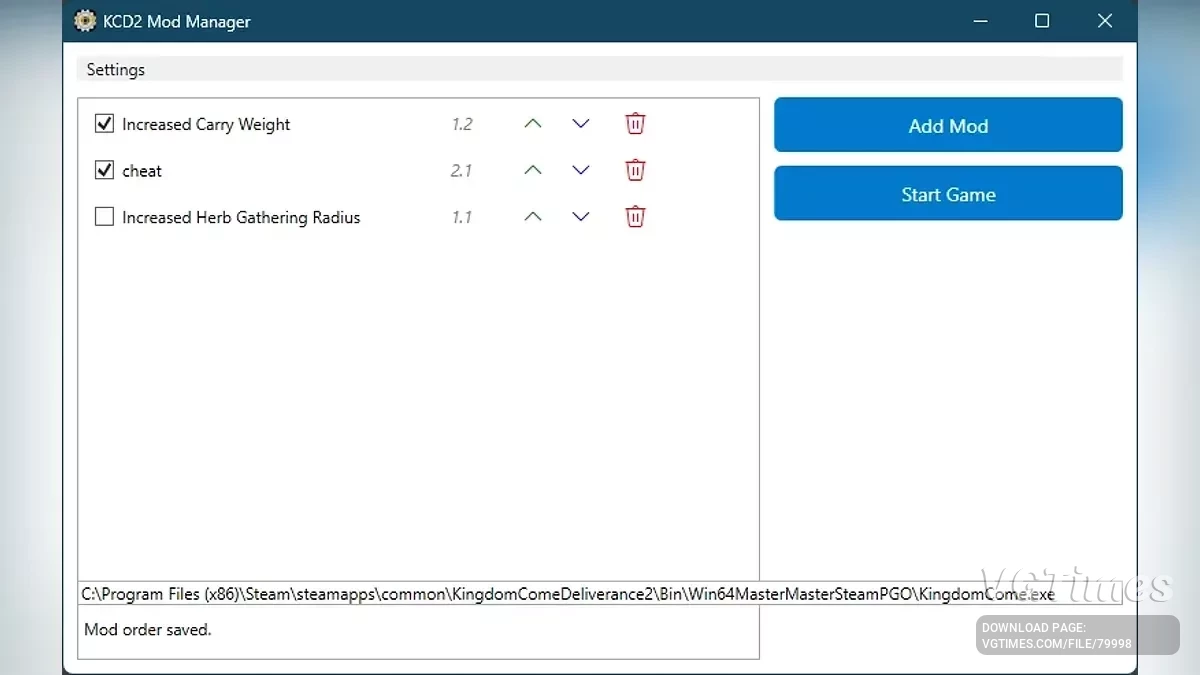
This tool is designed to enhance the modding experience. It helps users manage their mods by automatically detecting them. The tool also facilitates seamless installation, version checking, and organization of mods. The manager tracks mod versions, ensures compatibility, and simplifies enabling or disabling mods. This utility eliminates the need for manual management, providing a smooth experience for modders.
Features:
- Install mods;
- Select mod order;
- Enable and disable mods without deleting them;
- Automatic mod updates (coming soon);
- Merge mods (coming soon).
How to run (portable version):
- Download the mod manager;
- Unpack the mod manager files;
- Right-click on the downloaded file and select "Extract All..." or use your tool to unpack the contents;
- Select the folder where the mod manager will be stored (e.g., C:\KCD2ModManager\ or any other folder);
- Run the mod manager. Go to the folder where you unpacked the files. Double-click on the KCD2 mod manager.exe file to launch the program. Since this is a portable version, the program does not require installation and can be run directly from the unpacked folder.
How to install mods:
- After launching KCD2 mod manager.exe, the program window should open and be ready for use;
- Simply drag and drop the mod file (in zip, rar, or 7z format) from the file explorer into the mod manager window. The mod will be automatically extracted and placed in the Mods folder;
- Alternatively, click the "Add Mod" button in the mod manager. Use the file selection dialog to choose the mod archive zip, rar, or 7z, and the mod manager will automatically extract and install it;
- Ensure that the mod is installed in the Mods folder of the game Kingdom Come: Deliverance. The mod manager handles this automatically, but you can always check by verifying the mod files after installation.
Это инструмент, разработанный для улучшения опыта моддинга. Он помогает пользователям управлять своими модами, автоматически обнаруживая их. Инструмент также облегчает бесшовную установку, проверку версий и организацию модов. Менеджер отслеживает версии модов, обеспечивает совместимость и упрощает включение или отключение модов. Эта утилита устраняет необходимость ручного управления, обеспечивая плавный опыт для моддеров.
Особенности:
- Установка модов;
- Выбор порядка модов;
- Включение и отключение модов без их удаления;
- Автоматическое обновление модов (скоро);
- Объединение модов (скоро).
Как запустить (портативная версия):
- Скачайте менеджер модов;
- Распаковать файлы менеджера модов;
- Щелкнуть правой кнопкой мыши на загруженном файле и выбрать «Извлечь все...» или использовать свой инструмент для распаковки содержимого;
- Выбрать папку, в которой будет храниться менеджер модов (например, C:\KCD2ModManager\ или любую другую папку);
- Запустить менеджер модов. Перейти в папку, в которую распаковали файлы. Дважды щелкнуть по файлу KCD2 mod manager.exe, чтобы запустить программу. Поскольку это портативная версия, программа не требует установки и может быть запущена прямо из распакованной папки.
Как устанавливать моды:
- После запуска KCD2 mod manager.exe окно программы должно открыться и быть готовым к использованию;
- Просто перетащить файл мода (в формате zip, rar или 7z) из проводника файлов и бросить его в окно менеджера модов. Мод будет автоматически извлечен и помещен в папку Mods;
- В качестве альтернативы нажать кнопку «Добавить мод» в менеджере модов. Использовать диалог выбора файлов, чтобы выбрать архив мода zip, rar или 7z, и менеджер модов автоматически извлечет и установит его;
- Убедиться, что мод установлен в папку Mods игры Kingdom Come: Deliverance. Менеджер модов автоматически справляется с этим, но всегда можно проверить это, проверив файлы мода после установки.
Useful links:
![Kingdom Come: Deliverance 2 — Table for Cheat Engine [UPD: 07.03.2025]](https://files.vgtimes.com/download/posts/2025-03/thumbs/tablica-dlja-cheat-engine-upd-07-03-2025_1741423971_752002.webp)
![Kingdom Come: Deliverance 2 — Table for Cheat Engine [UPD: 10.03.2025]](https://files.vgtimes.com/download/posts/2025-03/thumbs/tablica-dlja-cheat-engine-upd-10-03-2025_1741690452_314232.webp)

![Kingdom Come: Deliverance 2 — Table for Cheat Engine [UPD: 16.05.2025]](https://files.vgtimes.com/download/posts/2025-05/thumbs/tablica-dlja-cheat-engine-upd-16-05-2025_1747560029_137062.webp)

![Kingdom Come: Deliverance 2 — Table for Cheat Engine [UPD: 2.01.2025]](https://files.vgtimes.com/download/posts/2025-02/thumbs/tablica-dlja-cheat-engine-upd-2-01-2025_1740297338_612211.webp)
![Kingdom Come: Deliverance 2 — Trainer (+41) [1.1 - 1.2]](https://files.vgtimes.com/download/posts/2025-03/thumbs/trejjner-41-1-1-1-2_1742028148_922525.webp)