
Temtem is a fun multiplayer role-playing game with collectible elements. The game is inspired by the Pokemon series of games. You have to travel through a fantasy... Read more
Localization Tool

-
Download (38.61 MB)September 13, 2024, 01:57 PM1662564525_utranslator.zipArchive password: vgtimes
Installation:
1. Download the archive.
2. Extract the archive to any location.
3. Run the file "UTranslator.exe"
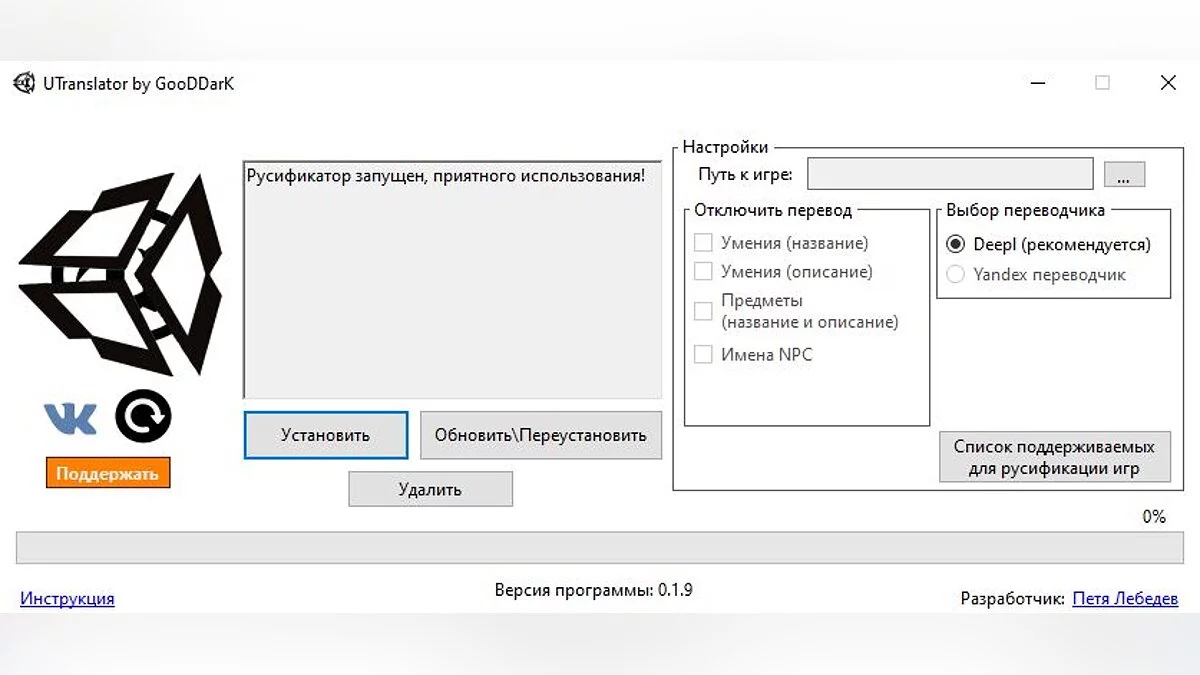
4. Specify the path to the game folder (where the game's .exe file is located).
5. Click the "Install" button and wait for the localization to finish (a message will appear confirming the installation is complete).
6. Launch the game.
Update/Reinstallation:
After updating the game, you need to run the localization tool and click the "Update/Reinstall" button; the program will check if new strings have been added to the game, and if so, it will translate them. If there are no new strings, the program will simply reinstall the existing translation for the new version of the game.
Removal:
The "Remove" button will completely delete the translation for the selected game. Before removal, you need to specify the path to the game whose translation you want to delete.
After removing the translation, check the integrity of the game files through Steam.
Updating UTranslator:
To check for and automatically download a new version of the localization tool, you can use a separate button to avoid having to manually download the new version constantly.
Follow updates and other news about the project in the VKontakte group — vk.com/utranslator.
Установка:
1. Скачать архив.
2. Распаковать архив в любое место.
3. Запустить файл «UTranslator.exe»
4. Указать Путь к папке с игрой (где лежит .exe файл игры).
5. Нажать кнопку «Установить» и дождаться окончания русификации (показывается сообщение о завершении установки).
6. Запустить игру.
Обновление/Переустановка:
После обновления игры нужно запустить русификатор и нажать кнопку «Обновить/Переустановить», программа проверит были ли в игру добавлены новые строки и если таковые имеются, то переведет их. Если же новых строк нет, программа просто переустановит готовый перевод на новую версию игры.
Удаление:
Кнопка "Удалить" полностью удалит перевод выбранной игры. Перед удалением нужно указать путь к игре, перевод которой вы хотите удалить.
После удаления перевода проверьте целостность игровых файлов через Steam.
Обновление UTranslator'а:
Для проверки и автоматической загрузки новой версии русификатора можно использовать отдельную кнопку, дабы постоянно не скачивать новую версию вручную.
За обновлениями и другими новостями проекта следи в группе ВКонтакте — vk.com/utranslator
Useful links: