An adventure soulslike action game in a dark fantasy world, created by the developers of the Dark Souls series with the involvement of the author of *A Song of Ice... Read more
Cinematic Tonal Converter
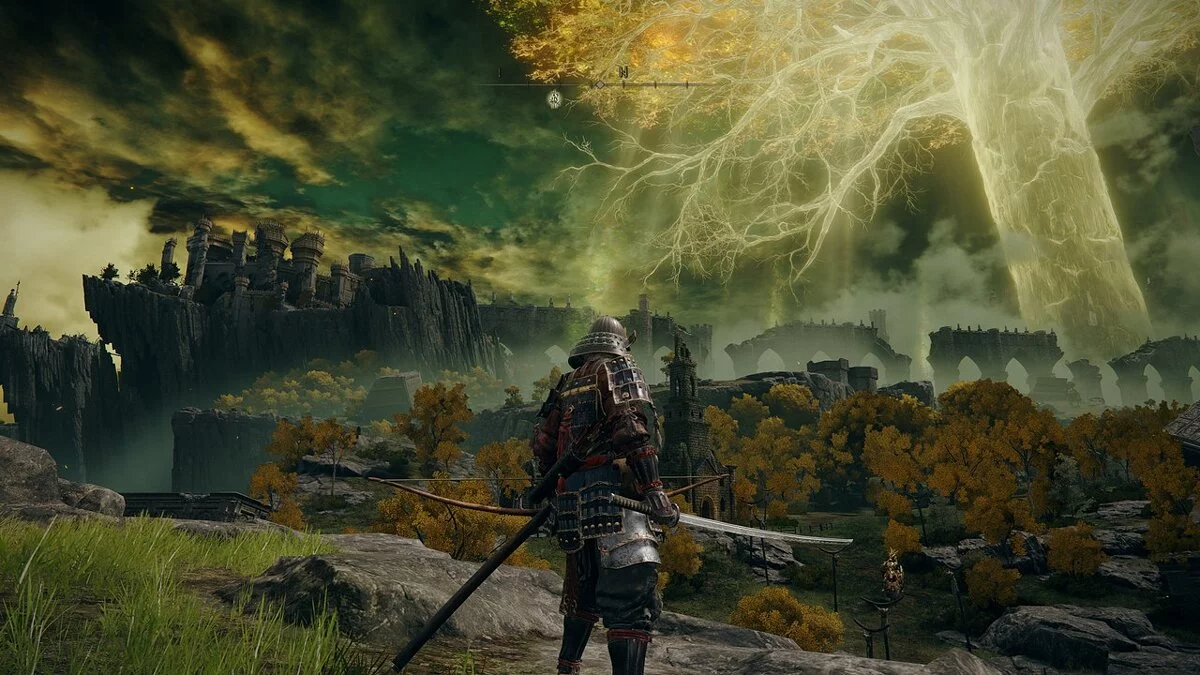


-
www.nexusmods.comDownload
Simple Filmic Reshade (Vanilla Enhancement).
A straightforward Reshade that utilizes a cinematic tonal converter. It deepens shadows, brightens highlights, and slightly boosts saturation while maintaining fidelity to FromSoft's color grading and atmosphere. I feel that in all FromSoft games, they tend to 'inflate' the image; there's a tendency to make it too gray/light with insufficient shadow depth. This simple tweak makes dungeons and shaded corners darker, while bright objects become more vivid (without losing detail), and the surrounding world, in particular, becomes brighter and more dynamic. This is as intended by FromSoft, but just a bit better, which nonetheless makes a significant difference by enhancing what is already there.
Installation:
1) Download the file (SimpleFilmicReshade.ini) and place it in the main directory of Elden Ring (where the executable is located).
2) Go to reshade.me and download version 5.02 (future versions will also work).
3) Install it in the main directory of Elden Ring, selecting the executable when prompted.
4) When asked to choose a preset, select SimpleFilmicReshade.ini.
5) Click 'Next' until the installation is complete.
6) While in-game, pay attention to the pop-up at the top. Press the 'Home' key to go through a brief tutorial. 'SimpleFilmicReshade' should be active if you did this (4).
7) Optional: Go to the third tab 'Settings' to set hotkeys for toggling the effect (default is unbound; I use 'Insert') and for screenshots (default is 'Print Screen').
Simple Filmic Reshade (Vanilla Enhancement).
Простой Reshade, использующий кинематографический тональный преобразователь. Углубляет тени, осветляет блики и немного увеличивает насыщенность, сохраняя при этом верность цветокоррекции и атмосфере FromSoft. Мне кажется, что во всех играх FromSoft они слишком «раздувают» изображение; у них есть тенденция делать его слишком серым/светлым с недостаточной глубиной теней. Это простая настройка, благодаря которой подземелья и затененные углы становятся темнее, а яркие предметы — ярче (без потери деталей), в то время как окружающий мир, в частности, становится более ярким и динамичным. Это так, как задумано FromSoft, но только немного лучше, что, тем не менее, имеет большое значение, улучшая то, что уже есть.
Установка:
1) Загрузите файл (SimpleFilmicReshade.ini) и поместите его в основной каталог Elden Ring (где находится исполняемый файл).
2) Перейдите на reshade.me и скачайте 5.02 (будущие версии тоже подойдут).
3) Установите в основной каталог Elden Ring, выбрав исполняемый файл при появлении запроса.
4) Когда вас попросят выбрать пресет, выберите SimpleFilmicReshade.ini.
5) Нажимайте «Далее», пока установка не будет завершена.
6) Во время игры обратите внимание на всплывающее окно вверху. Нажмите клавишу «Домой», чтобы пройти небольшое руководство. «SimpleFilmicReshade» должен быть активен, если вы это сделали (4).
7) Необязательно: перейдите на третью вкладку «Настройки», чтобы установить горячие клавиши для переключения эффекта (по умолчанию не привязано; я использую «Вставить») и скриншотов (по умолчанию «Печать экрана»).
Useful links:
![Elden Ring — Cheat Engine Table [1.03.2]](https://files.vgtimes.com/download/posts/2022-04/thumbs/1649844514_elden-ring-30.webp)
![Elden Ring — Cheat Engine Table [UPD: 04/19/2022]](https://files.vgtimes.com/download/posts/2022-04/thumbs/1650443921_elden-ring-limgrave-vista.webp)
![Elden Ring — Cheat Engine Table [UPD: 04.05.2022]](https://files.vgtimes.com/download/posts/2022-04/thumbs/1649232145_yd7wwvwd6ecst2rpu3sgje.webp)
![Elden Ring — Cheat Engine Table [UPD: 25.02.2022]](https://files.vgtimes.com/download/posts/2022-02/thumbs/1645871055_597024_rjnwxau_ss-abd681cde3402155a35edb82919b7602cc7ec338.webp)
![Elden Ring — Cheat Engine Table [UPD: 28.02.2022]](https://files.vgtimes.com/download/posts/2022-03/thumbs/1646129317_0cc415ce5b41d23d_1920xh.webp)
![Elden Ring — Cheat Engine Table [UPD: 27.02.2022]](https://files.vgtimes.com/download/posts/2022-02/thumbs/1645999560_elden-ring-new-header-mobile.webp)
![Elden Ring — Cheat Engine Table [UPD: 25.03.2022]](https://files.vgtimes.com/download/posts/2022-03/thumbs/1648244325_elden-ring-pc-game-steam-europe-wallpaper-5.webp)
![Elden Ring — Cheat Engine Table [1.03.1 v4]](https://files.vgtimes.com/download/posts/2022-03/thumbs/1648028325_a7mxcvvm62h7.webp)
![Elden Ring — Cheat Engine Table [UPD: 21.03.2022]](https://files.vgtimes.com/download/posts/2022-03/thumbs/1647939417_a9927a21-6203-4b98-9484-2e37566fccf1.webp)