
A colorful strategy game in the tower defense genre, where an ordinary country house is under siege by an army of funny but extremely persistent zombies. The only... Read more
New Plants Mod (Expansion)



-
1586729198_new_plants_mod_for_plants_vs_zombies_addition.rarDownload (2.77 MB)
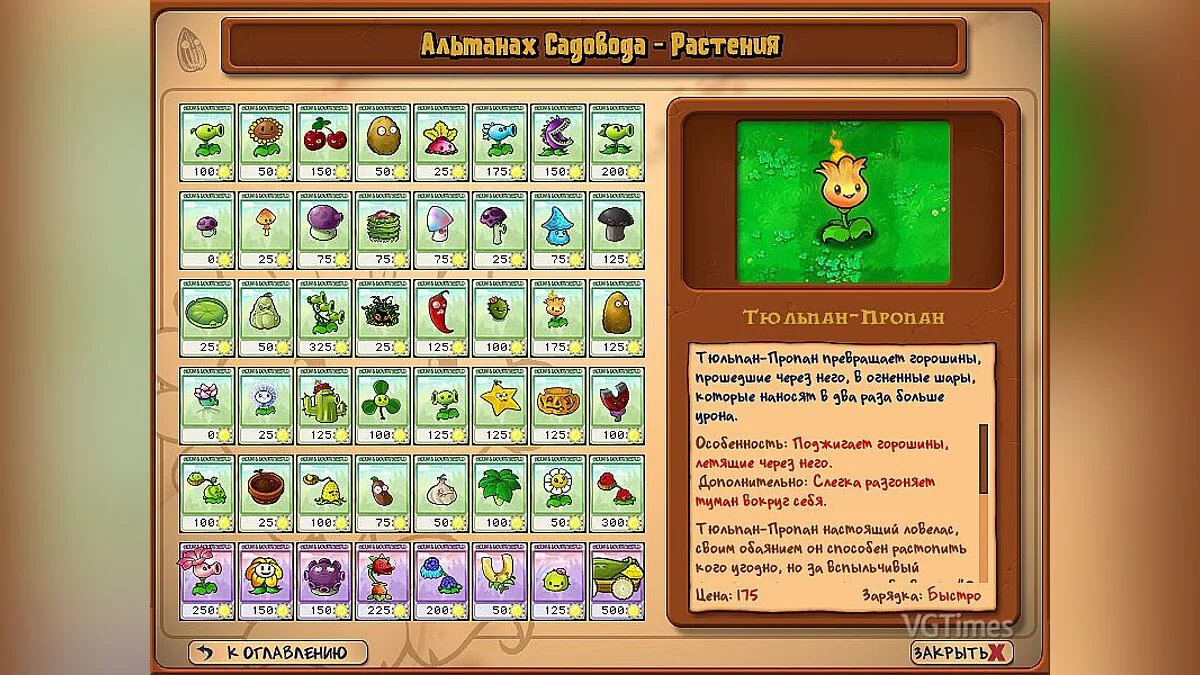
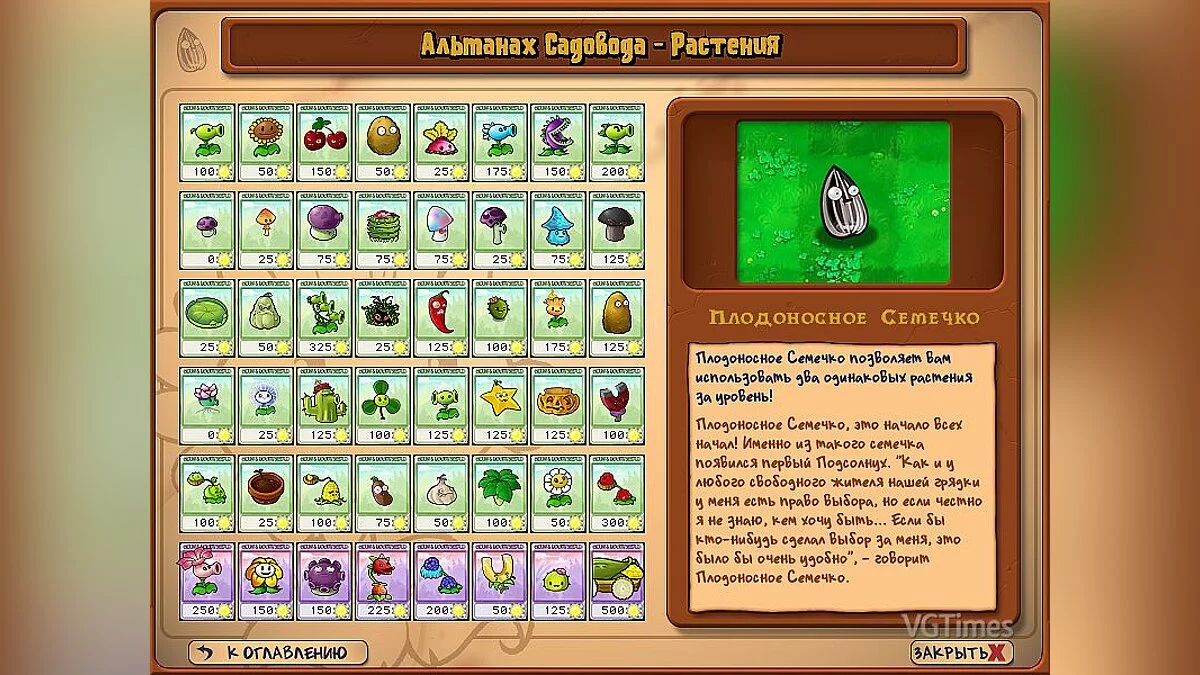
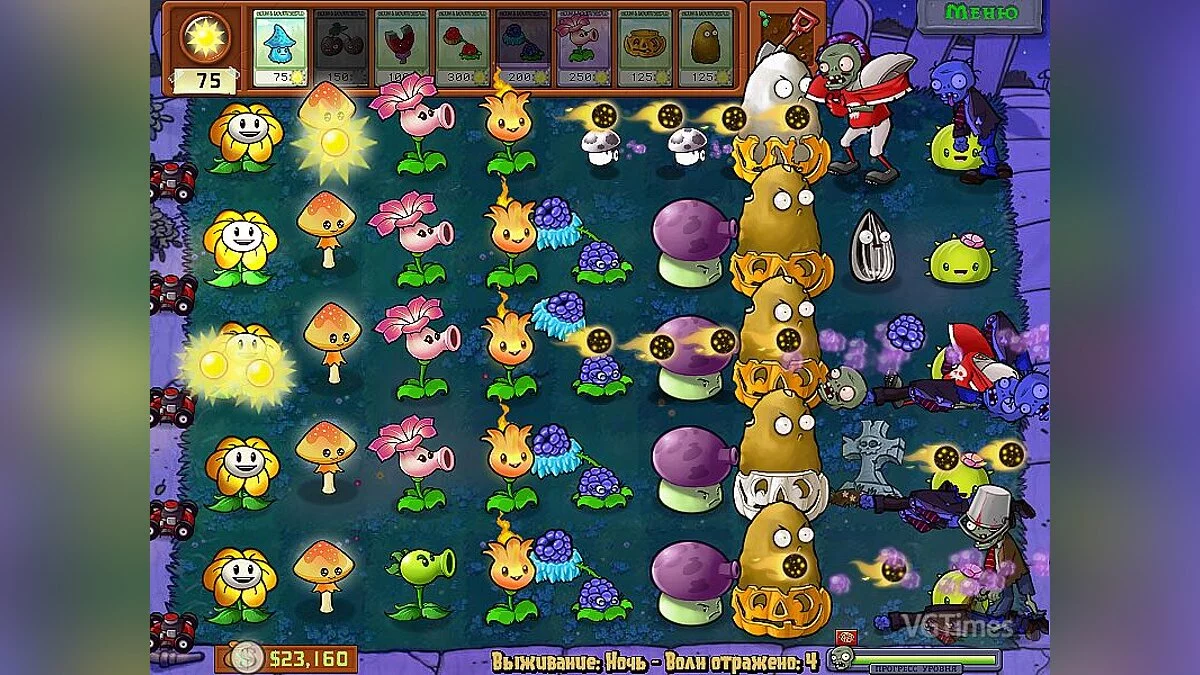
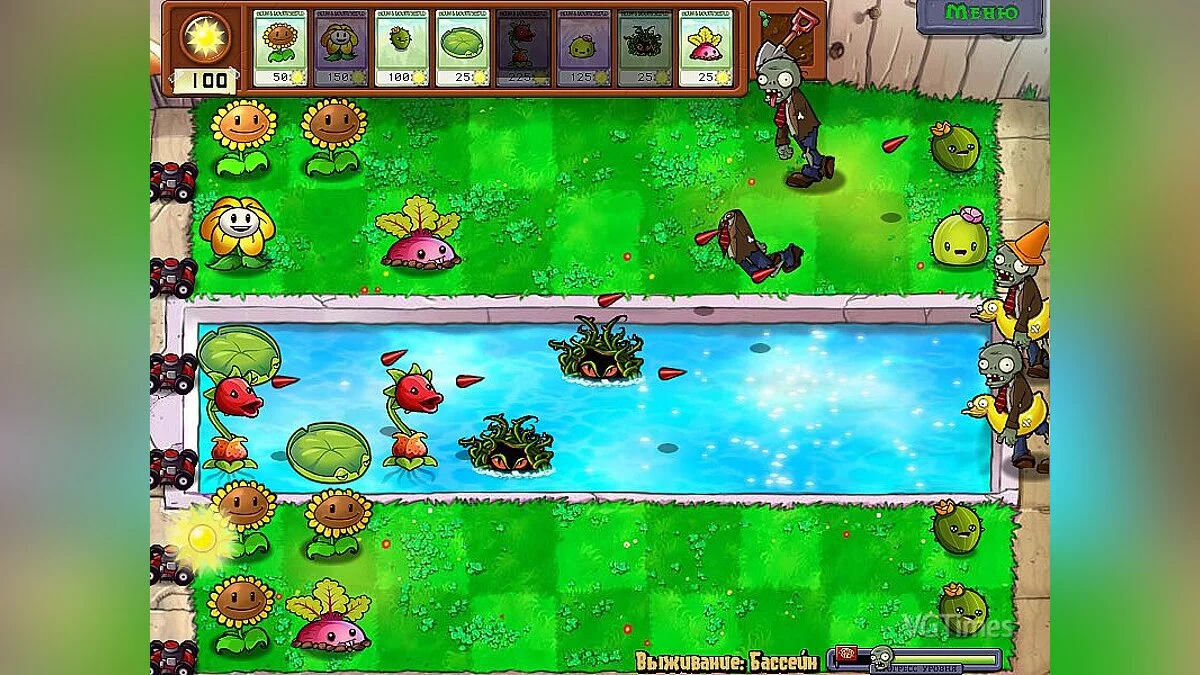
This is my custom mod that replaces many plants with new ones, changing their appearance and description, while the game mechanics remain unchanged, so all plant abilities stay the same. I created this modification based on my previous mod Plants vs. Zombies "New Plants Mod" where I decided to fix several issues and add new modifications for plants that were not present in the previous version.
The mod consists of two archives [Separate Mod.rar] and [New Plants Mod v2.rar]
- The archive [Separate Mod.rar] is smaller in size, containing only the new modifications for plants that were not in the previous version (more details can be found in the "Change Log" section). I made this separate mod in case someone wants to install only the new plants in their game.
- The archive [New Plants Mod v2.rar] is a larger mod that replaces almost all plants with new ones. It includes all my previous modifications and new ones.
Each archive contains two folders [Mod] and [Backup]:
Change Log:
- Imitator replaced with Fruitful Seed
- Thorns and Stone Thorns replaced with Gooseberry and Thorny Thornbush
- Catmouse replaced with Water Lily Spitter (the Water Lily Spitter model is based on Nependeath from the game MapleStory)
- Stump-Fakir replaced with Tulip-Propane
- Ice Mushroom has updated textures and animations
- Hypno Mushroom has been given a multicolored shimmering effect on its cap
- In the archive [New Plants Mod v2.rar], in addition to all the aforementioned mods, modifications from the previous version are also present.
Instructions:
- *Note! The mod is intended for the Russian version of the game as it replaces the plant descriptions. If you have the English version, please install a text localizer for your game first. A quality Russian localizer can be downloaded from this site via THIS LINK. Also, for the mod to work correctly, you will need the Popcap Pack Utility to unpack the game archive files [main.pak] of the game "Plants Vs Zombies". You can download it from this site via THIS LINK. It also explains how to unpack the game files. You can play with unpacked resources, but you will need to delete the file [main.pak] and extract all the unpacked game files from the [main] folder (which will appear after unpacking the files) into the directory with the installed game. (I will provide more details about this in the comments)
- Installation: After you unpack the game files, choose one of the mod archives [New Plants Mod v2.rar] or [Separate Mod.rar]. Then extract the [Mod] folder from the mod archive. Copy the contents of this folder into the folder with the installed game, confirming the replacement of files.
- Removal: Extract the [Backup] folder from the mod archive. Copy the contents of this folder into the folder with the installed game, confirming the replacement of files.
Это мой авторский мод, который заменяет многие растения на новые, меняется их внешний вид и описание, механика игры не изменена, поэтому все способности растений остаются прежними. Данную модификацию я создавала на основе своего предыдущего мода Plants vs. Zombies "Мод Новые растения" я решила исправить ряд недочётов и добавить новые модификации для растений, которых в предыдущей версии не было.
Мод состоит из двух архивов [Отдельный мод.rar] и [Мод новые растения v2.rar]
- Архив [Отдельный мод.rar] этот мод меньше по объёму, в него входят только новые модификации для растений, которых не было в предыдущей версии (подробнее читайте в разделе "Список изменений") Я сделала этот отдельный мод на случай, если кому-то захочется установить только новые растения на свою игру.
- Архив [Мод новые растения v2.rar] Это более крупный мод, который заменяет практически все растения на новые. Он включает в себя все мои предыдущие модификации и новые.
В каждом архиве присутствует по две папки [Mod] и [Backup]:
Список изменений:
- Имитатор заменён на Плодоносное Семечко
- Колючки и Каменные Колючки заменены на Крыжовник и Шип-Шиповник
- Кошкамышь заменён на Кувшинку Плевунью (образ Кувшинки Плевуньи создан по образу Nependeath из игры MapleStory)
- Пень-Факир заменён на Тюльпан-Пропан
- У Ледогриба заменены текстуры и анимация
- Для Гипногриба добавлен эффект разноцветного мерцания на шляпке гриба
- В архиве [Мод новые растения v2.rar] помимо всех вышеупомянутых модах также присутствуют модификации из предыдущей версии.
Инструкция:
- *Примечание! Мод предназначен для русскоязычной версии игры так как заменяет описание растений. Если у вас английская версия предварительно установите русификатор текста на свою игру. Качественный русификатор можно скачать на этом сайте по ЭТОЙ ССЫЛКЕ Также, для корректной работы мода вам понадобится Утилита Popcap Pack чтобы распаковать файлы игрового архива [main.pak] игры "Plants Vs Zombies". Скачать её можно на этом сайте, по ЭТОЙ ССЫЛКЕ Там так же написано как именно распаковать игровые файлы. Играть можно с распакованными ресурсами, но будет необходимо удалить файл [main.pak], и извлечь все разархивированные игровые файлы из папки [main] (которая появится после распаковки файлов) в директорию с установленной игрой. (Подробнее об этом я напишу в комментариях)
- Установка: После того как вы распакуете файлы игры, выберите один из архивов с модом [Мод новые растения v2.rar] или [Отдельный мод.rar]. Затем из архива с модом извлеките папку [Mod]. Содержимое этой папки скопируйте в папку с установленной игрой, с подтверждением замены файлов.
- Удаление: Из архива с модом извлеките папку [Backup]. Содержимое этой папки скопируйте в папку с установленной игрой, с подтверждением замены файлов.
Useful links:
![Plants vs. Zombies — Trainer (+19) [1.2.0.1096]](https://files.vgtimes.com/download/posts/2023-12/thumbs/trejjner-19-1-2-0-1096_1703079490_575215.webp)
![Plants vs. Zombies — Cheat Engine Table (+16) [Steam Version]](https://files.vgtimes.com/download/posts/2020-03/thumbs/1583068767_1583068725_789.webp)
![Plants vs. Zombies — Cheat Engine Table [UPD: 19.10.2024] — PvZ Fusion](https://files.vgtimes.com/download/posts/2024-10/thumbs/tablica-dlja-cheat-engine-upd-19-10_1729423860_433600.webp)
![Plants vs. Zombies — Cheat Engine Table [1.2.0.1073]](https://files.vgtimes.com/download/posts/2023-11/thumbs/tablica-dlja-cheat-engine-1-2-0-1073_1698928431_654118.webp)
![Plants vs. Zombies — Cheat Engine Table [2.2] — Fusion Edition + Hybrid](https://files.vgtimes.com/download/posts/2025-02/thumbs/tablica-dlja-cheat-engine-2-2-fusion_1739009959_792899.webp)
![Plants vs. Zombies — Cheat Engine Table [1.2.0.1096]](https://files.vgtimes.com/download/posts/2023-12/thumbs/tablica-dlja-cheat-engine-1-2-0-1096_1703079746_572682.webp)
![Plants vs. Zombies — Trainer (+7) [1.2.0.1096] [h4x0r]](https://files.vgtimes.com/download/posts/2017-03/thumbs/1489060899_1489060799_835.webp)
![Plants vs. Zombies — Plants vs Zombies: Trainer (+5) [1.2.0.1073] {Apocalypticx}](https://files.vgtimes.com/download/posts/2017-09/thumbs/plants-vs-zombies-trejjner-5-1-2-0-1073_1713866835_796701.webp)
![Plants vs. Zombies — Cheat Engine Table [UPD: 11.11.2024] — PvZ Fusion Edition [2.1.4]](https://files.vgtimes.com/download/posts/2024-11/thumbs/tablica-dlja-cheat-engine-upd-11-11_1731412923_203992.webp)