
Ravenfield is a tactical shooter with a first-person view for single player play. Together with the blue men you have to destroy those annoying red men using... Read more
Players:
Steam:
RavenM v0.7 Beta - Multiplayer Mod
Author:
iliadsh
Uploaded by:

Size:
1.51 MB
Date:
July 1, 2024, 12:32 PM
Downloads:
1613

-
Download (1.51 MB)July 1, 2024, 12:31 PMravenm-v0-7-beta-mnogopolzovatelskijj_1719826319_462463.zip
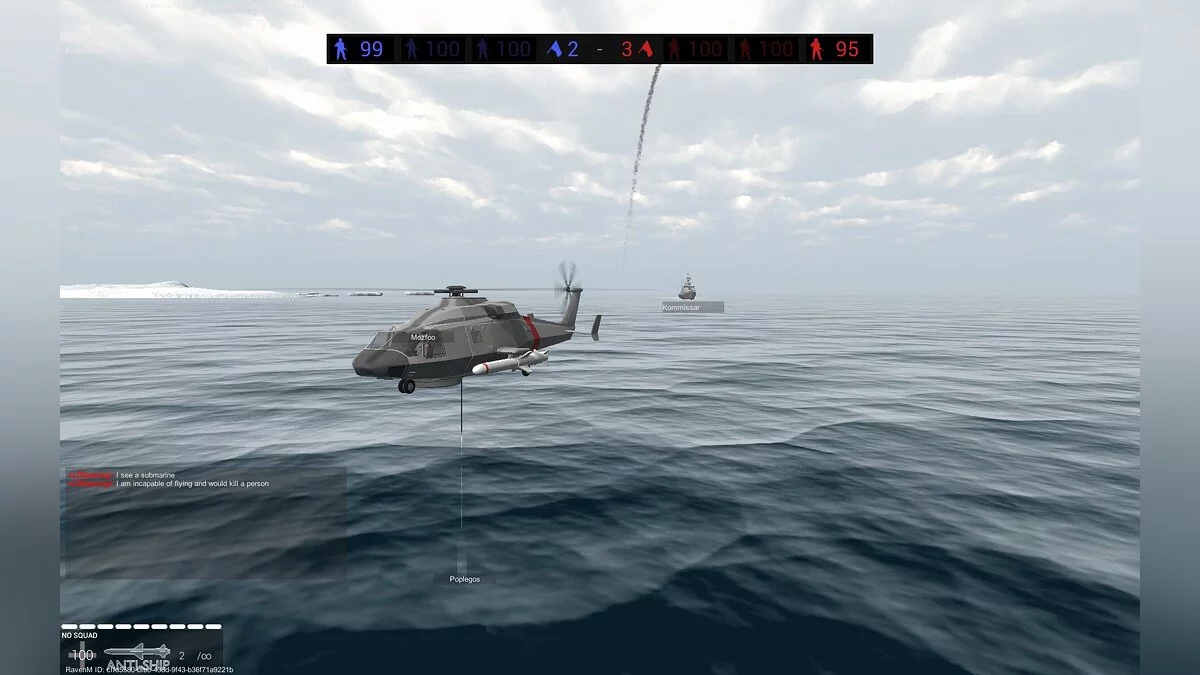
Multiplayer mod for Ravenfield.
- Important note: RavenM does not support BepInEx version 6. To complete the installation, ensure that the latest version of BepInEx 5.x.x is installed.
- This mod depends on BepInEx, a cross-platform framework for Unity modding. First, install BepInEx in Ravenfield by following the installation instructions here. According to the instructions, before adding the mod to generate configuration files, make sure to run the game at least once with BepInEx installed.
- Next, place RavenM.dll in the Ravenfield/BepInEx/plugins/ folder. Optionally, you can also place RavenM.pdb to generate debug information in the logs.
Brief instructions:
- The connection menu opens with the M key in the Instant Action menu.
- Pirated/unofficial copies of Ravenfield may encounter issues when using RavenM. The mod relies entirely on Steam for safe transfer of game data and mods between players.
- To play together, one player must be the host. This player will control the behavior of all bots, game settings, and the current state of the game. All other players will connect to the host during the match. Despite this, port forwarding is not required.
Hosting:
- Go to the Instant Action menu and press M. Click "Host" and choose whether the lobby will be available only to friends or not. After clicking "Start," you will enter the lobby. At this point, you cannot exit the Instant Action page without leaving the lobby. Other players can join using the lobby ID.
- Starting the game will move everyone into the lobby for the match and close the lobby.
Joining:
- Go to the Instant Action menu and press M. Click "Join" and paste the ID of the existing lobby. At this point, you cannot change any settings on the Instant Action page except for selecting a team. You also cannot start the match. The settings chosen by the host will be reflected in your own settings.
The file name and description have been translated Show original
(RU)Show translation
(EN)
RavenM v0.7 Beta — многопользовательский мод
Многопользовательский мод для Ravenfield.
- Важное замечание: RavenM не поддерживает BepInEx версии 6. Для завершения установки убедитесь, что установлена последняя версия BepInEx 5.x.x.
- Этот мод зависит от BepInEx, кроссплатформенного фреймворка для моддинга Unity. Сначала установить BepInEx в Ravenfield, следуя инструкциям по установке здесь. Согласно инструкциям, перед добавлением мода для генерации конфигурационных файлов обязательно запустить игру хотя бы один раз с установленным BepInEx.
- Далее поместить RavenM.dll в папку Ravenfield/BepInEx/plugins/. По желанию также можно поместить RavenM.pdb, чтобы генерировать отладочную информацию в логах.
Краткая инструкция:
- Меню подключения открывается клавишей M в меню Instant Action.
- Пиратские/неофициальные копии Ravenfield могут столкнуться с проблемами при использовании RavenM. Мод полностью полагается на Steam для безопасной передачи игровых данных и модов между игроками.
- Чтобы играть вместе, один игрок должен быть хостом. Этот игрок будет контролировать поведение всех ботов, параметры игры и текущее состояние игры. Все остальные игроки будут подключаться к хосту во время матча. Несмотря на это, переадресация портов не требуется.
Хостинг:
- Перейти в меню Instant Action и нажать M. Нажать «Host» и выбрать, будет ли лобби доступно только для друзей или нет. После нажатия «Start» вы попадете в лобби. В этот момент вы не сможете выйти из страницы Instant Action, не покинув лобби. Другие игроки могут подключиться, используя ID лобби.
- Начало игры перенесет всех в лобби в матч и завершит работу лобби.
Присоединение:
- Перейти в меню Instant Action и нажать M. Нажать «Join» и вставить ID лобби существующего лобби. В этот момент вы не сможете изменять какие-либо параметры на странице Instant Action, кроме выбора команды. Вы также не сможете начать матч. Настройки, выбранные хостом, будут отражены в ваших собственных параметрах.
Useful links:
![Ravenfield — Trainer (+15) [UPD: 20.12.2024]](https://files.vgtimes.com/download/posts/2025-01/thumbs/trejjner-15-upd-20-12-2024_1737108127_209931.webp)
![Ravenfield — Trainer (+15) [UPD: 14.12.2024]](https://files.vgtimes.com/download/posts/2024-12/thumbs/trejjner-15-upd-14-12-2024_1734347389_850187.webp)
![Ravenfield — Cheat Engine Table [UPD: 26.04.2024]](https://files.vgtimes.com/download/posts/2024-04/thumbs/tablica-dlja-cheat-engine-upd-26-04-2024_1714208313_705428.webp)
![Ravenfield — Trainer (+7) from 25.08.2023 [WeMod]](https://files.vgtimes.com/download/posts/2023-08/thumbs/trejjner-7-ot-25-08-2023-wemod_1693043724_993978.webp)
![Ravenfield — Trainer (+25) [UPD: 14.12.2025]](https://files.vgtimes.com/download/posts/2025-12/thumbs/trejjner-25-upd-14-12-2025_1766560948_549773.webp)
![Ravenfield — Trainer (+7) from 08.05.2023 [WeMod]](https://files.vgtimes.com/download/posts/2023-08/thumbs/trejjner-7-ot-05-08-2023-wemod_1691239667_113272.webp)
![Ravenfield — Trainer (+7) from 11.20.2020 [WeMod]](https://files.vgtimes.com/download/posts/2020-11/thumbs/1605857112_2020-11-20_102414.webp)
![Ravenfield — Cheat Mod (+15) v4.2.0 [UPDATED: 31.10.2024]](https://files.vgtimes.com/download/posts/2024-11/thumbs/chit-mod-15-v4-2-0-upd-31-10-2024_1730540482_808234.webp)