A role-playing action set in a pseudo-open world of distant space, focusing on well-developed and immersive quests with high replayability in every playthrough. The... Read more
Players:
Metacritic:
Enhanced Sarah Morgan
Author:
reindeer51
Uploaded by:

Size:
6.66 MB
Date:
November 15, 2023, 09:58 AM
Downloads:
654
-
Download (6.66 MB)November 15, 2023, 09:58 AMuluchshennaja-sara-morgan_1700031497_516669.zip
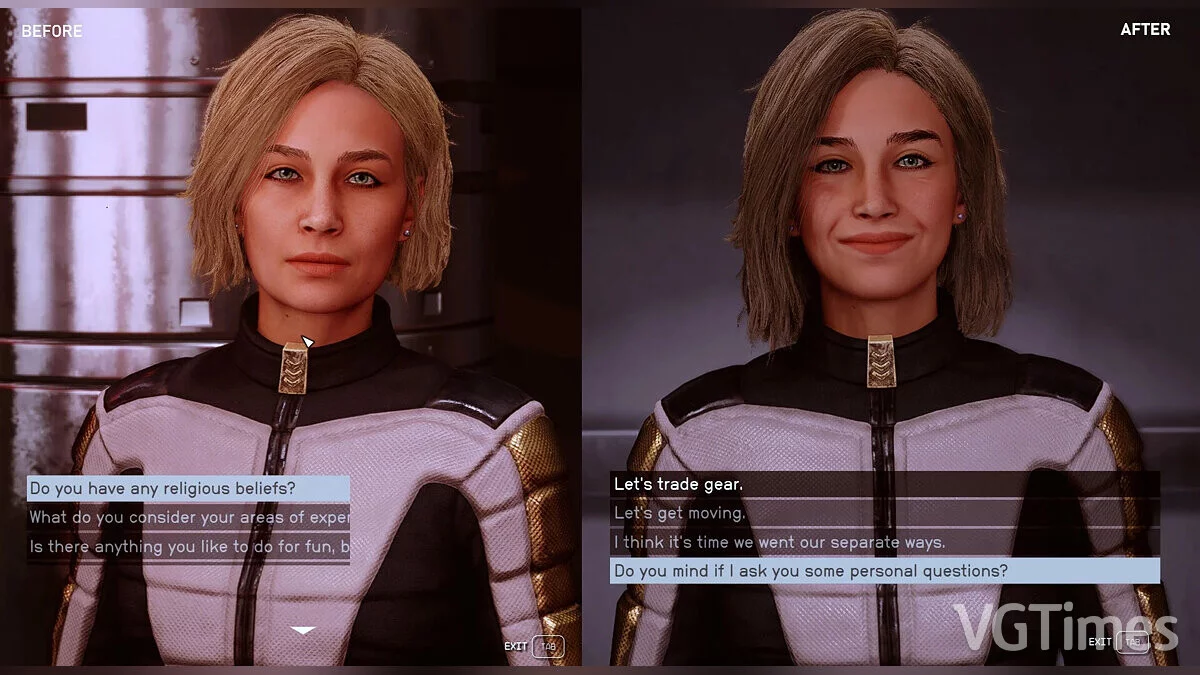
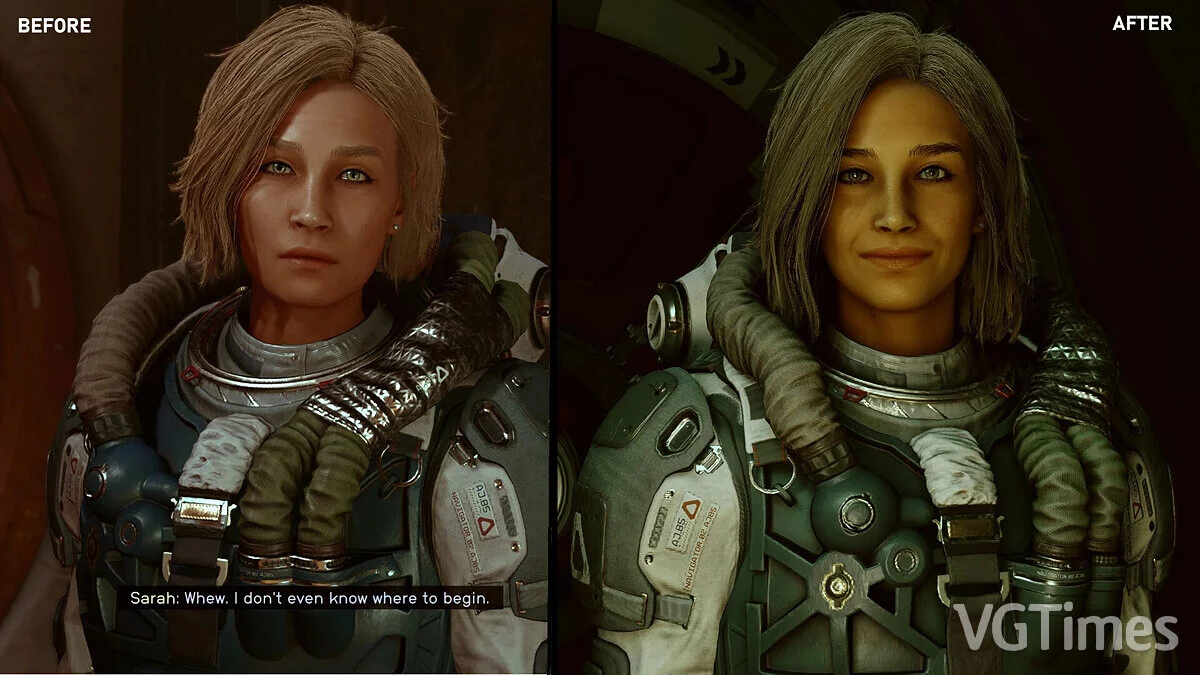
Visual overhaul of Sarah Morgan.
How to start:
STEP 1: Backup the player's appearance
- press ~ in the game, then enter player.placeatme 299f6d. <-- This will spawn Genghis Khan.
- press ~ again, click on Genghis Khan and enter capp 14. <-- This will transfer your current player face to the NPC.
STEP 2: Edit Sarah's face through your player
- type 14.capp 5986 . <-- This will transfer Sarah's face to your player's character.
- enter slm 14 to enter the face editor. Now follow the same slider settings as in the pictures. IMPORTANT: If you get a different face during the initial face setup, move the slider to the first option.
STEP 3: Transfer the edited face to Sarah
- exit the face editor, press ~ and enter prid 5986, then capp 14. <-- This will transfer your face to Sarah's face.
- click on Genghis Khan, note his ID at the top, then enter 14.capp <identifier>. <-- This will transfer your face back to Genghis Khan's face.
- enter disable to remove Genghis Khan.
The file name and description have been translated Show original
(RU)Show translation
(EN)
Улучшенная Сара Морган
Визуальная переработка Сары Морган.
Как запустить:
ШАГ 1: Резервное копирование внешнего вида игрока
- нажать ~ в игре, затем ввести player.placeatme 299f6d. <-- Это приведет к появлению Чингисхана.
- снова нажать ~, щелкнуть на Чингисхане и ввести capp 14. <-- Это перенесет ваше текущее лицо игрока на NPC.
ШАГ 2: Редактирование лица Сары через своего игрока
- набрать 14.capp 5986 . <-- Это перенесет лицо Сары на персонажа вашего игрока.
- ввести slm 14, чтобы войти в редактор лица. Теперь следовать тем же настройкам ползунка, что и на рисунках. ВАЖНО: Если при начальной настройке лица вы получите другое лицо, переместите ползунок на первый вариант.
ШАГ 3: Перенос отредактированногр лица на Сару
- выйти из редактора лиц, нажать ~ и ввести prid 5986, а затем capp 14. <-- Это перенесет ваше лицо на лицо Сары.
- щелкнуть на Чингисхане, обратить внимание на его ID вверху, затем ввести 14.capp <идентификатор>. <-- Это перенесет ваше лицо обратно на лицо Чингисхана.
- ввести disable, чтобы удалить Чингисхана.
Useful links:
![Starfield — Cheat Engine Table [UPD: 17.09.2023]](https://files.vgtimes.com/download/posts/2023-09/thumbs/tablica-dlja-cheat-engine-upd-17-09-2023_1695035862_297605.webp)
![Starfield — Cheat Engine Table [UPD: 11.09.2024]](https://files.vgtimes.com/download/posts/2024-09/thumbs/tablica-dlja-cheat-engine-upd-11-09-2024_1726133800_541092.webp)
![Starfield — Table for Cheat Engine [UPD: 18.06.2025]](https://files.vgtimes.com/download/posts/2025-06/thumbs/tablica-dlja-cheat-engine-upd-18-06-2025_1750319351_261529.webp)
![Starfield — Cheat Engine Table [UPD: 09.03.2023: GamePass]](https://files.vgtimes.com/download/posts/2023-09/thumbs/tablica-dlja-cheat-engine-upd-03-09_1694261874_848113.webp)
![Starfield — Cheat Engine Table [UPD: 01.09.2023 Fixed]](https://files.vgtimes.com/download/posts/2023-09/thumbs/tablica-dlja-cheat-engine-upd-01-09_1694174060_480380.webp)
![Starfield — Cheat Engine Table [UPD: 22.09.2023]](https://files.vgtimes.com/download/posts/2023-09/thumbs/tablica-dlja-cheat-engine-upd-22-09-2023_1695473080_779469.webp)