Close to the Sun is an adventure horror game with a first-person view in a steampunk style. The game will take you to the beginning of the 20th... Read more
Players:
Steam:
Metacritic:
Cheat Engine Table [UPDATED: 04.12.2020]
Author:
SunBeam
Uploaded by:

Size:
5.38 kB
Date:
April 13, 2020, 03:20 PM
Downloads:
334
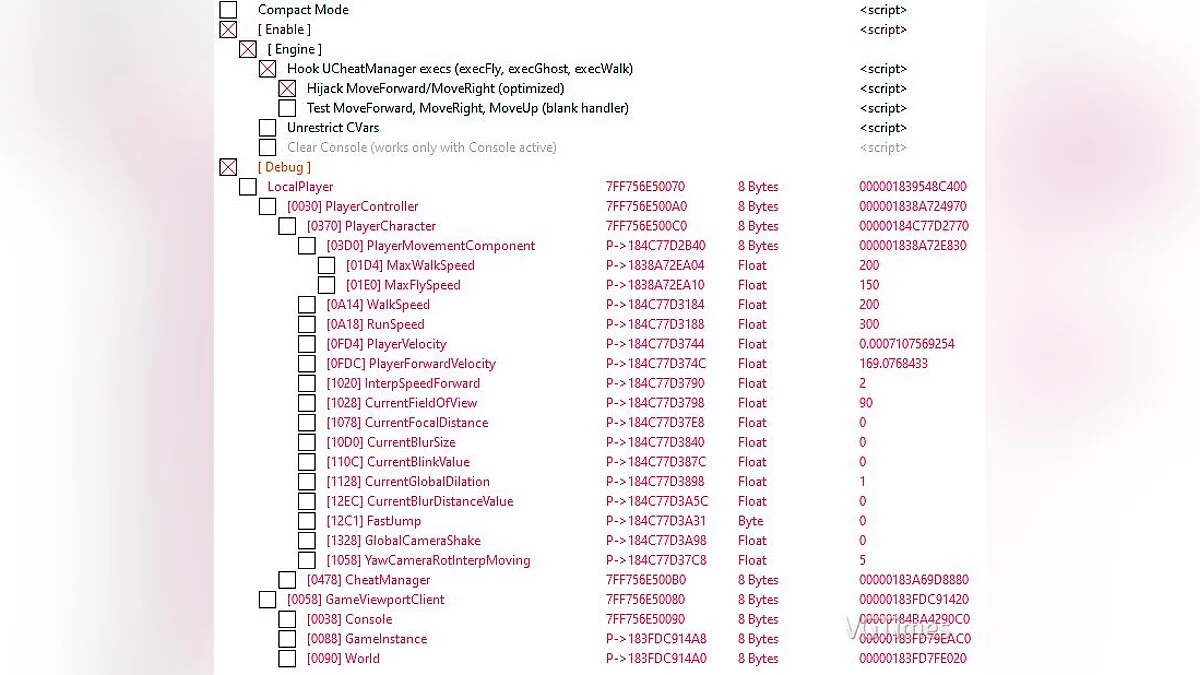
Included a table that enables various functionalities:
- [ Activate ]
Main hook, essential for the rest to function.
- Hook UCheatManager execs (execFly, execGhost, execWalk)
The script reinstates the core fly, ghost, walk console commands. This must be active for the following scripts to operate.
- Hijack MoveForward/MoveRight (optimized)
The script intercepts the execution point of forward and right movement functions. It substitutes that execution with my functions, allowing unrestricted movement across all axes (including Z). Be aware that I do not advise keeping this enabled when unnecessary, for several reasons: a) attaching to a ladder counts as "flying"; hence, you will continuously ascend the ladder while pressing the W key; b) certain events may malfunction due to the hook being active.
- Test MoveForward, MoveRight, MoveUp (blank handler)
This hook disregards any constraints and simply moves your character forward, backward, left, right, up, down when you press the WASD keys, Space for up, and Ctrl for down. If flying isn't activated, it effectively doubles the movement speed (as if you pressed W twice rapidly). The choice is yours
- For additional information, refer to the [ Debug ] section and experiment; please refrain from asking "what does this do?" Test them yourself to find out. Some merely track values (e.g.: PlayerVelocity shows the current velocity without altering anything), while others can be modified. For instance: if you wish to fly faster, adjust the default speed from 150 to 400; you will notice the difference.
Launch process:
1. Start Cheat Engine, click "Load" and select the table
2. "Select a process to open", choose the desired process.
3. Select the desired option and check it off.
The file name and description have been translated Show original
(RU)Show translation
(EN)
Таблица для Cheat Engine [UPD: 12.04.2020]
Added a table that allows you do several things:
- [ Enable ]
Main hook, you need this active for the rest to work.
- Hook UCheatManager execs (execFly, execGhost, execWalk)
The script restores the core of fly, ghost, walk console commands. You need this enabled for the subsequent scripts underneath it to work.
- Hijack MoveForward/MoveRight (optimized)
The script hooks the spot where a ProcessEvent execution of forward and right movement functions occurs. It replaces that execution with my functions, to allow free movement on all axis (including Z). NOTE that I do not recommend keeping this enabled when you have no use for it, for several reasons: a) when you attach a ladder, that counts as "flying"; so you will endlessly climb the ladder as you press W key; b) some events might fuck-up due to the hook being in place.
- Test MoveForward, MoveRight, MoveUp (blank handler)
This hook will not take into account any constrictions and just move your character forward, backward, left, right, up, down when you press WASD keys and Space for up and Ctrl for down. If fly isn't enabled, then it will basically double the movement speed (as if you pressed W twice very fast). Your choice
- For anything else, see [ Debug ] section and test stuff out; please, no "what does this one do?" questions. Test them yourself to get the answer. Some are just tracking values (e.g.: PlayerVelocity just shows the current velocity, doesn't alter anything), some can be changed. Example: if you want to move faster while flying, change the default speed from 150 to 400; you'll notice the difference.
Процесс запуска:
1. Запустить Cheat Engine, "Load" и выбрать таблицу
2. "Select a process to open", выбрать нужный процесс.
3. Выбрать нужную опцию, поставить крест.
Related files:
Useful links: