After a mysterious dream, the player is in the world of Daca - severe and complete dangers. Outside the shelter, enemies are hidden, and resources are worth its... Read more
BepInEx 5
Author:
BepInEx Authors
Uploaded by:

Size:
623.96 kB
Date:
October 28, 2025, 06:41 AM
Downloads:
1199
-
Download (623.96 kB)October 28, 2025, 06:41 AMbepinex-5_1761622881_227118.zip
BepInEx 5 framework is required to run all mods for this game and also includes the configuration manager mod for in-game settings changes. This version is for Windows 64bit only. Users on other OS should follow the installation guides on the BepInEx GitHub page.
Controls:
- Press F1 in-game to open the configuration menu and change plugin settings.
How to install:
- In Steam, right-click Escape from Duckov => Manage => Browse local files;
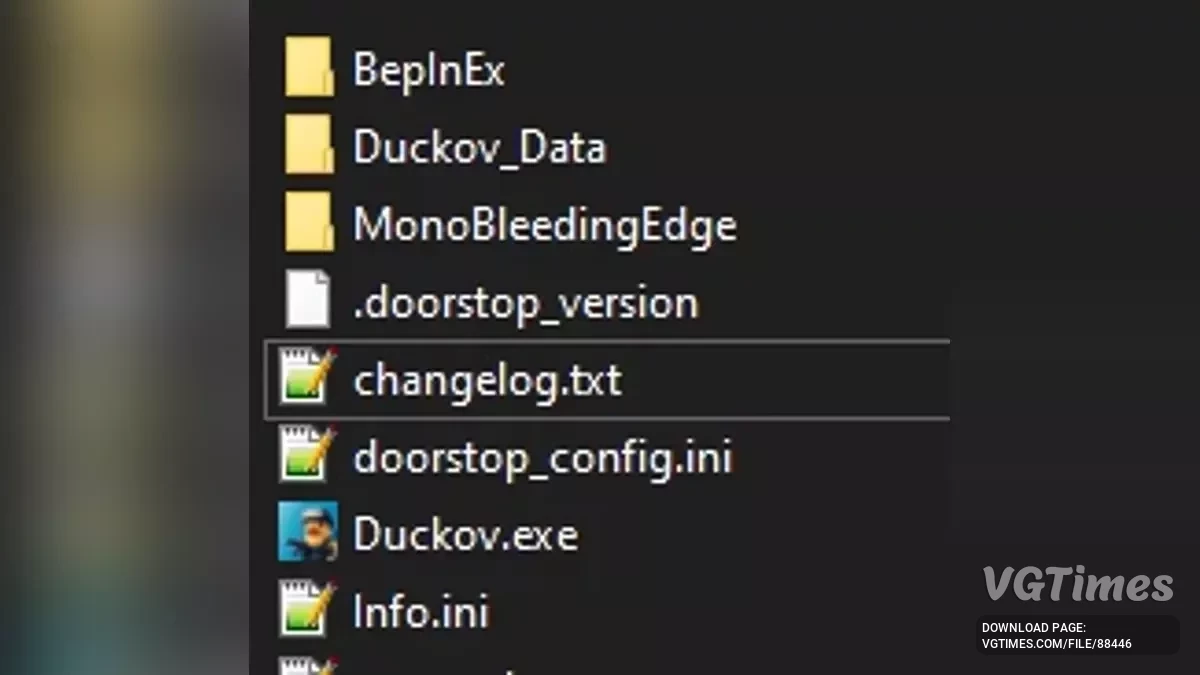
- Drag all files from the archive into the game folder. The folder structure should match the example shown in the mod's image;
- Launch the game and then close it;
- In File Explorer, open the BepInEx folder inside Escape from Duckov. If you see two new folders (plugins and config), BepInEx is installed correctly and ready for plugins;
- You can now download and use plugins by extracting them into the BepInEx/plugins folder.
Useful links:


![Escape from Duckov — Table for Cheat Engine [1.0.20]](https://files.vgtimes.com/download/posts/2025-10/thumbs/tablica-dlja-cheat-engine-1-0-20_1760950210_120480.webp)
![Escape from Duckov — Table for Cheat Engine [1.0.25]](https://files.vgtimes.com/download/posts/2025-10/thumbs/tablica-dlja-cheat-engine-1-0-25_1760874172_200299.webp)