
The game takes place in modern Tokyo. The plot begins at the famous Shibuya pedestrian crossing, when in an instant absolutely all the inhabitants of the city... Read more
Natural Shade
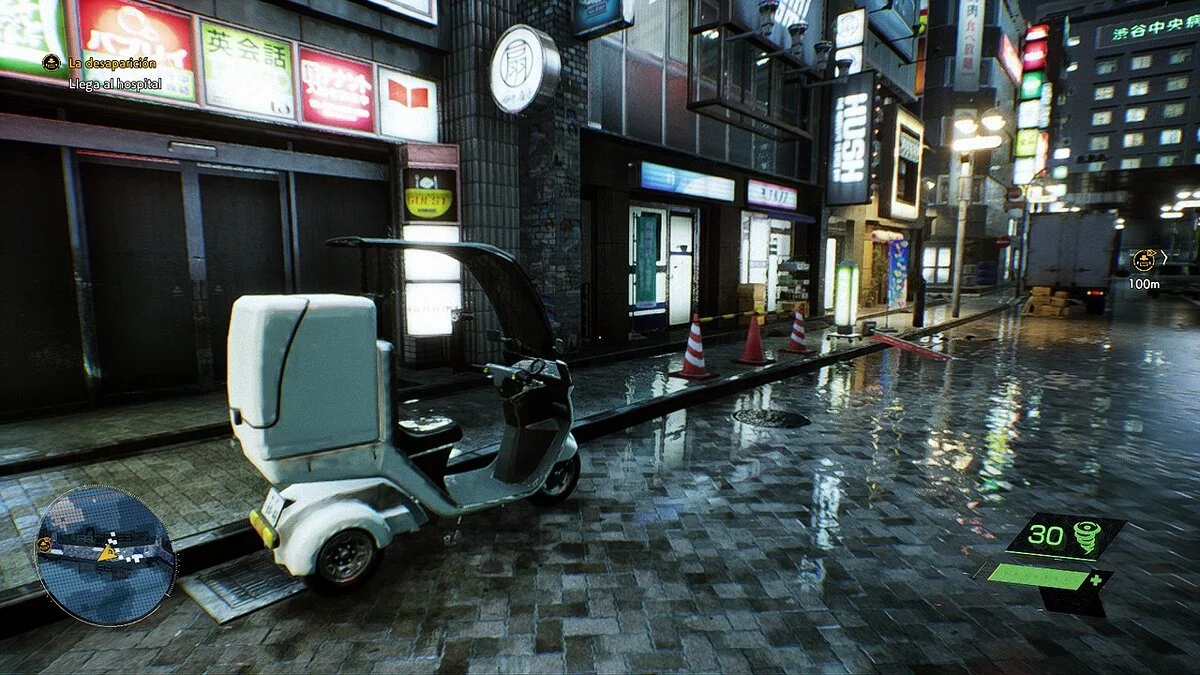


-
www.nexusmods.comDownload
Natural Reshade.
Utilizes qUINT_mxao, requires access to the depth buffer.
Installation and Setup:
- Install the latest Reshade.
- Unzip the preset into the game executable folder. Overwrite all.
"NUM — K" — toggle on/off.
Launch the game (YOU MUST BE IN THE GAME, NOT IN THE MENU) and press the HOME key to bring up the Reshade overlay.
Enable the DisplayDepth shader. Now, if you see the left half of the screen in strange colors and the right side in shades of gray, it is already working, turn off DisplayDepth and enjoy.
Natural Reshade.
Использует qUINT_mxao, требуется доступ к буферу глубины.
Установка и настройка:
- Установите последний Reshade.
- Разархивируйте пресет в папку с исполняемым файлом игры. Перепишите все.
«NUM — K» — вкл/выкл.
Запустите игру (ВЫ ДОЛЖНЫ БЫТЬ В ИГРЕ, А НЕ В МЕНЮ) и нажмите клавишу HOME, чтобы появился оверлей Reshade.
Включите шейдер DisplayDepth. Теперь, если вы видите левую половину экрана в странных цветах, а правую сторону в оттенках серого, это уже работает, выключите DisplayDepth и наслаждайтесь.
Useful links:
![Ghostwire: Tokyo — Trainer (+17) from 06.05.2022 [WeMod]](https://files.vgtimes.com/download/posts/2022-06/thumbs/1654497245_2022-06-06_093223.webp)
![Ghostwire: Tokyo — Table for Cheat Engine [UPD: 01.04.2022]](https://files.vgtimes.com/download/posts/2022-04/thumbs/1648802342_ghostwire.webp)
![Ghostwire: Tokyo — Trainer (+16) [1.0]](https://files.vgtimes.com/download/posts/2022-03/thumbs/1648244162_wkdm9fpsqngxgxf2f675bg.webp)
![Ghostwire: Tokyo — Cheat Engine Table [UPD: 29.07.2023]](https://files.vgtimes.com/download/posts/2023-08/thumbs/tablica-dlja-cheat-engine-upd-29-07-2023_1691658419_310017.webp)
![Ghostwire: Tokyo — Cheat Engine Table [1.0]](https://files.vgtimes.com/download/posts/2022-03/thumbs/1648244051_ghostwire_tokyo.webp)
![Ghostwire: Tokyo — Trainer (+17) [1.0 - UPDATED: 05.18.2023]](https://files.vgtimes.com/download/posts/2023-12/thumbs/trejjner-17-1-0-upd-18-05-2023_1703579938_107880.webp)
![Ghostwire: Tokyo — Table for Cheat Engine [UPD: 29.03.2022]](https://files.vgtimes.com/download/posts/2022-03/thumbs/1648624127_ghostwire-tokyo-art.webp)