
Mount & Blade 2: Bannerlord is a continuation of the series of role-playing action games set in a fictional medieval world filled with battles. Horns are sounding... Read more
Rome

-
1589752983_roma_invicta_1491_1_0_0_1589563090.zipDownload (43.37 kB)
Installation instructions:
Vortex:
Step 1: Follow the usual instructions to install this mod.
Step 2: Ensure the mod is located where it should be: "C:\Steam\steamapps\common\Mount & Blade II Bannerlord\Modules\RomaInvicta" (your actual path may vary)
Step 3: Install the mod: Kingdom Color Changer (if it hasn't been installed previously)
Step 4: Copy the file labeled "KingdomColor.xml" from the RomaInvicta module folder.
Step 5: Go to "C:\Users\your\Documents\Mount and Blade II Bannerlord\Configs" and paste the copied file (you can back up the existing KingdomColor.xml file or choose "yes, overwrite the existing file")
Step 6: Launch the Bannerlord launcher, select the "Mods" tab, and confirm/activate both mods. Note: KingdomColor and Roma Invicta should appear below the official Taleworlds modules, such as Native, Sandbox, StoryMode, etc.
Guide:
Step 1. By default, extract the module folder to: "C:\Steam\steamapps\common\Mount & Blade II Bannerlord\Modules"
Step 2: Install the mod: Kingdom Color Changer (if not previously installed)
Step 3: Copy the file labeled "KingdomColor.xml" from the RomaInvicta module folder.
Step 4: Go to "C:\Users\your\Documents\Mount and Blade II Bannerlord\Configs" and paste the copied file (you can back up the existing KingdomColor.xml file or choose "yes, overwrite the existing file")
Step 5: Launch the Bannerlord launcher, select the "Mods" tab, and confirm/activate both mods. Note: KingdomColor and Roma Invicta should appear below the official Taleworlds modules, i.e., Native, Sandbox, StoryMode, etc.
What's currently available:
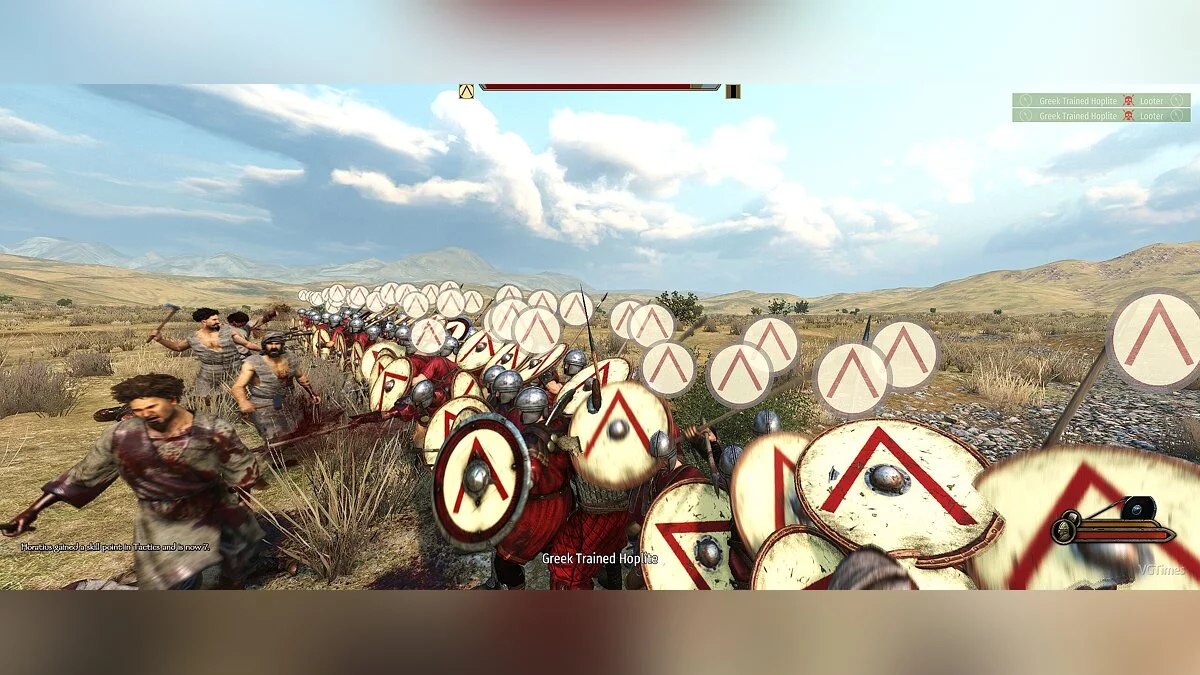
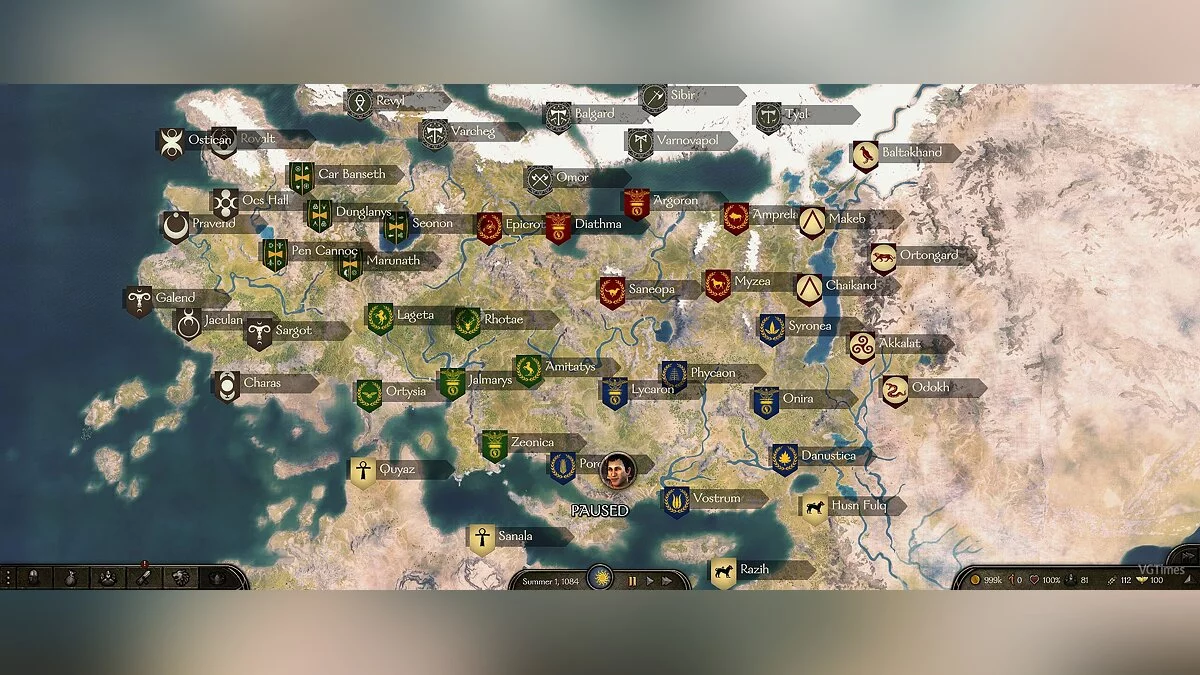
• All new major factions
• Roman Empire
• House of Julii
• House of Scipii
• House of Brutii
• Greek cities
Gaul
• Germanic tribes
• Iberia
• Egypt
• Each faction has unique uniform colors
• All new unit trees
• A plethora of new weapons/shields (available in-game for players)
• Units have higher scalable skill values (hopefully making combat more challenging and rewarding)
• New unique faction banners.
• Units incur movement penalties based on weight (the days of fully armored troops running at Mach 1 are over).
• All shields can now block overhead attacks (some shield positions may need adjustment).
• Faction recruits will carry banners (some factions have been intentionally excluded).
Инструкции по установке:
Vortex:
Шаг 1: Следуйте обычным инструкциям для установки этого мода.
Шаг 2: Убедитесь, что мод находится там, где он должен находиться: "C: \ Steam \ steamapps \ common \ Mount & Blade II Bannerlord \ Modules \ RomaInvicta" (ваш фактический путь может отличаться)
Шаг 3: Установите мод:Kingdom Color Changer(если он не был установлен ранее)
Шаг 4: Скопируйте файл с пометкой «KingdomColor.xml», находящийся в папке модуля RomaInvicta.
Шаг 5: Перейдите к «C: \ Users \» you \ Documents \ Mount and Blade II Bannerlord \ Configs "и вставьте скопированный файл (вы можете создать резервную копию существующего файла KingdomColor.xml или выбрать« да, перезаписать существующий файл) »
Шаг 6: Запустите панель запуска Bannerlord, выберите вкладку «Моды» и подтвердите / активируйте оба мода. Примечание: KingdomColor и Roma Invicta должны отображаться ниже официальных модулей Taleworlds, например, Native, Sandbox, StoryMode и т. Д.
Руководство:
Шаг 1. По умолчанию разархивируйте папку модуля в: «C: \ Steam \ steamapps \ common \ Mount & Blade». II Bannerlord \ Modules "
Шаг 2: Установите мод: Kingdom Color Changer (если не установлен ранее)
Шаг 3: Скопируйте файл с пометкой" KingdomColor.xml ", находящийся в папке модуля RomaInvicta.
Шаг 4: Перейдите в" C: \ Users \ " you \ Documents \ Mount and Blade II Bannerlord \ Configs "и вставьте скопированный файл (вы можете создать резервную копию существующего файла KingdomColor.xml или выбрать« да, перезаписать существующий файл) »
Шаг 5: Запустите панель запуска Bannerlord, выберите вкладку «Моды» и подтвердите / активируйте оба мода. Примечание: KingdomColor и Roma Invicta должны отображаться ниже официальных модулей Taleworlds, т.е. Native, Sandbox, StoryMode и т. Д.
Что в настоящее время доступно:
• Все новые крупные фракции
• Римская империя
• Дом Юлии
• Дом Сципии
• Дом Брутии
• греческие города
Галлия
• германские племена
• Иберия
• Египет
• Каждая фракция имеет уникальные однородные цвета
• Все новые деревья юнитов
• Множество нового оружия / щитов (которые доступны в игре для игрока)
• Юниты имеют более высокие масштабируемые значения навыков (с надеждой сделать бой более сложным и полезным )
• Новые уникальные баннеры фракций.
• Подразделения подвергаются штрафам за передвижение в зависимости от веса (прошли те дни, когда полностью бронированные отряды бегали на Mach1).
• Все щиты теперь могут блокировать накладные расходы (некоторые позиции щитов должны быть изменены).
• Новобранцы фракций будут переносить баннеры (некоторые фракции были преднамеренно исключены).
Useful links:
![Mount & Blade 2: Bannerlord — Trainer (+6) [1.0]](https://files.vgtimes.com/download/posts/2020-04/thumbs/1585779475_b37qfwqtz4wgo4ep7pttaq.webp)
![Mount & Blade 2: Bannerlord — Trainer (+22) [EA: 01.04.2020]](https://files.vgtimes.com/download/posts/2020-04/thumbs/1585779439_tvblpnpjem6gukr350iyug.webp)
![Mount & Blade 2: Bannerlord — Trainer (+30) [EA: 04.05.2020]](https://files.vgtimes.com/download/posts/2020-04/thumbs/1586089979_btmcblyg0xo7arc0ojsuua.webp)
![Mount & Blade 2: Bannerlord — Trainer (+25) [EA: 04.01.2020]](https://files.vgtimes.com/download/posts/2020-04/thumbs/1585779332_sxcu-iboi9xyuspqtiiceq.webp)
![Mount & Blade 2: Bannerlord — Trainer (+19) [Release Date: 30.03.2020]](https://files.vgtimes.com/download/posts/2020-03/thumbs/1585606967_yijczp9jhm6hw6pkfwnkcw.webp)
![Mount & Blade 2: Bannerlord — Table for Cheat Engine [e1.0.4] - RUS](https://files.vgtimes.com/download/posts/2020-04/thumbs/1586089737_0or08rfchwlv0xc66own2q.webp)
![Mount & Blade 2: Bannerlord — Trainer (+6) from 04.01.2020 [WeMod]](https://files.vgtimes.com/download/posts/2020-04/thumbs/1585765935_2020-04-01_212938.webp)
![Mount & Blade 2: Bannerlord — Trainer (+6) from 04.02.2020 [WeMod]](https://files.vgtimes.com/download/posts/2020-04/thumbs/1585855826_2020-04-02_222915.webp)
![Mount & Blade 2: Bannerlord — Trainer (+26) [1.0]](https://files.vgtimes.com/download/posts/2020-04/thumbs/1585831102_ipfmck9mpyjq-wre3ckm-a.webp)