Hot Finnish cocktail of a third-person survival simulator and car arcade. The player is given complete freedom of action in a large open world of... Read more
Disable All 1.0.2 — disabling objects to enhance performance

-
Download in TelegramNo waiting Download6.61 kBJuly 5, 2024, 10:31 AMdisable-all-1-0-2-otkljuchenie-obektov_1720164709_824905.zip
With this plugin, you can disable almost all game objects to increase FPS with the ability to disable them in real-time. This plugin also automatically loads a saved file with objects to disable (disables these objects). Currently, this is the most powerful plugin for increasing FPS.
What you need to know:
- Make a backup of your save before using it.
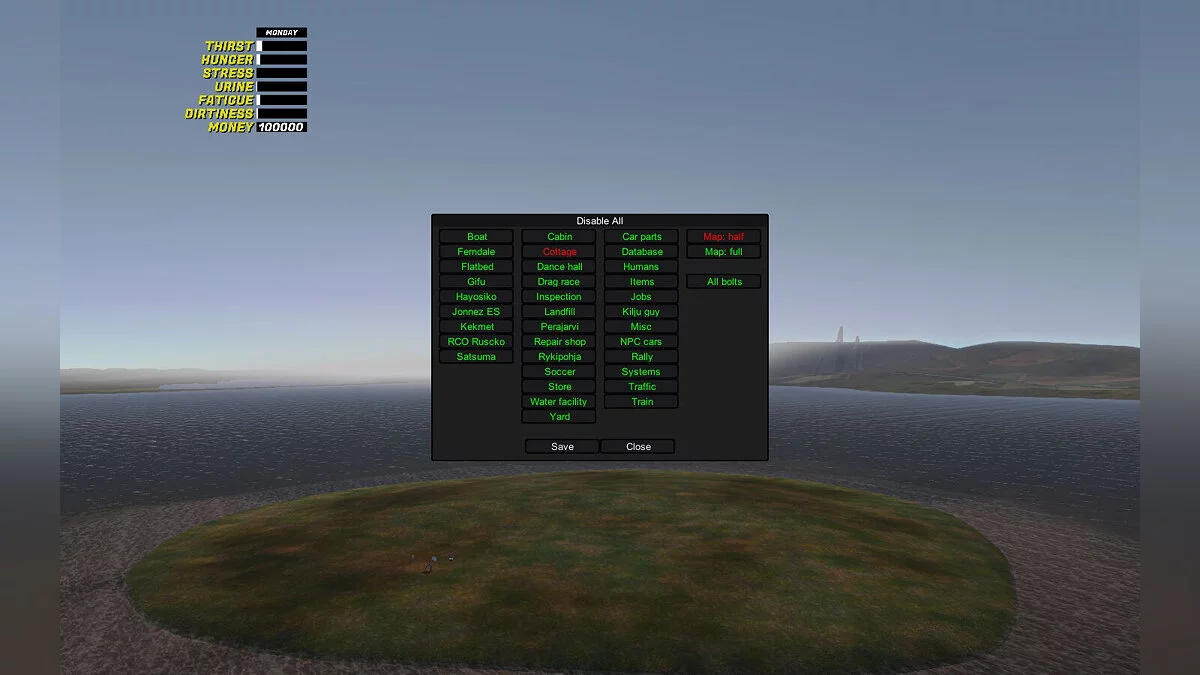
- The green button color means the object is enabled, while the red button color means the object is disabled.
- To interact with Satsuma after enabling it, you need to save and load the game.
- After enabling "Car parts," body panels may be damaged.
- "Systems" disables the game menu and the save system. Open the DisableAll interface and enable it if you need the game menu.
- You can use "Map: full" for assembling Satsuma (the garage and driveway are sufficient places for assembly).
- You cannot enable bolts without saving and loading the game (but you can attach a fallen-off part).
Hotkeys:
- Right Ctrl + D — open the Disable All interface.
Installation:
- Install MSCLoader;
- Move the file from the archive to My Summer Car/mods.
С помощью этого плагина можно отключить почти все игровые объекты для увеличения FPS с возможностью отключения в реальном времени. Также этот плагин автоматически загружает сохраненный файл с объектами для отключения (отключает эти объекты). На данный момент это самый мощный плагин для увеличения FPS.
Что нужно знать:
- Перед использованием сделайте резервную копию вашего сохранения.
- Зеленый цвет кнопки — объект включен, красный цвет кнопки — объект отключен.
- Для взаимодействия с Satsuma после его включения нужно сохранить и загрузить игру.
- После включения «Car parts» кузовные панели могут быть повреждены.
- «Systems» отключает игровое меню и систему сохранения. Откройте интерфейс DisableAll и включите его, если вам нужно игровое меню.
- Можно использовать «Map: full» для сборки Satsuma (гараж и подъезд — достаточные места для сборки).
- Нельзя включить болты без сохранения и загрузки игры (но можно прикрутить отвалившуюся часть).
Горячие клавиши:
- Right Ctrl + D — открыть интерфейс Disable All.
Установка:
- Установить MSCLoader;
- Файл из архива переместить по пути My Summer Car/mods.
Useful links: