
The continuation of the off-road driving simulator Spintires: MudRunner. You can expect realistic control mechanics, a well-developed gameplay process, as well as... Read more
Gear Shifting on the Numpad

-
1590064212_gearbox_at_numpad_v2020_05_20_by_displayboy_for_snowrunner_v4_10.zipDownload (201.74 kB)
Gearbox control on the Numpad.
This mod allows you to shift gears using keyboard buttons without the need for the 'Shift' key or mouse.
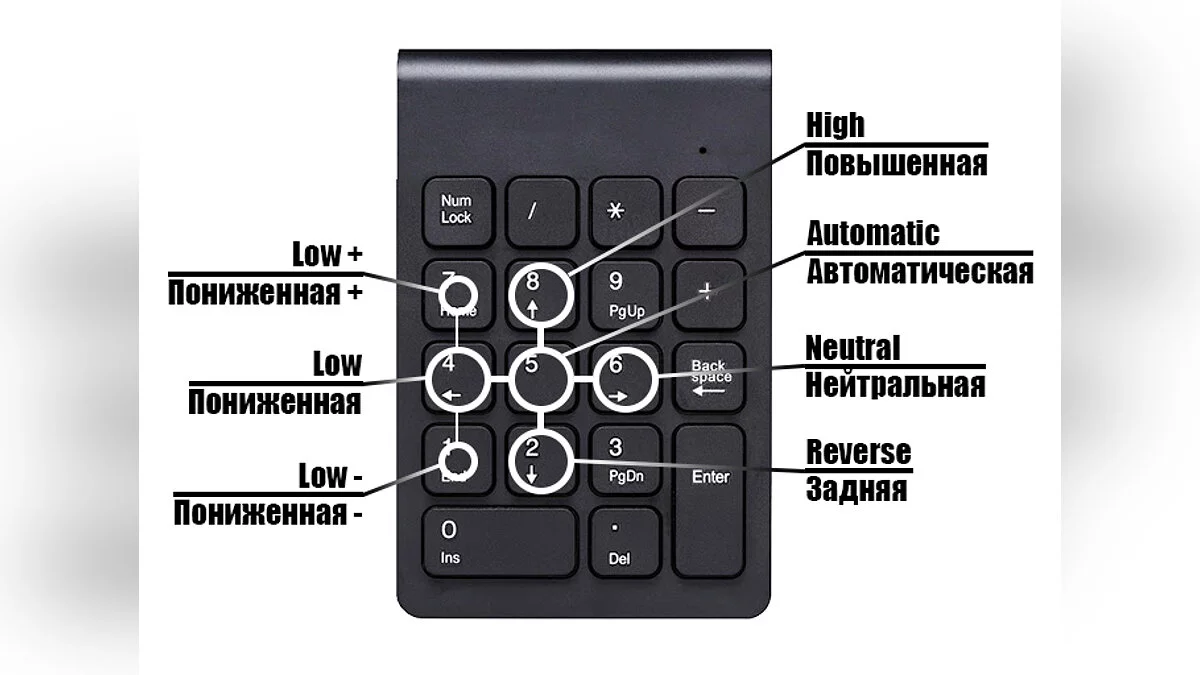
Gearbox controls (see screenshot #1):
5 — automatic
6 — neutral
2 — reverse
8 — higher gear
4 — lower gear
7 — lower gear +
1 — lower gear -
MANUAL SETTING ONLY!
WARNING! This mod overwrites the game settings file, affecting the sections 'GAME', 'INTERFACE', 'CONTROL', and 'STEERING WHEEL'.
After installing the mod, DO NOT MAKE CHANGES IN THE 'STEERING WHEEL' SECTION!
Installation steps:
1. Download this mod.
2. Navigate to the folder ..DocumentsMy GamesSnowRunnerbasestorageYOUR_ID
3. Close the game and back up the original file 'user_settings.dat'!
4. Copy the 'user_settings.dat' file from the 'en' or 'ru' folder into the open folder, replacing it.
NOTE:
- YOUR_ID — your account identifier, which is unique to each user (for example, acfc12a4b6ba4d53a27809af754c48b6);
- the 'en/ru' folders in the archive contain files for the English/Russian interface language, choose the one you need;
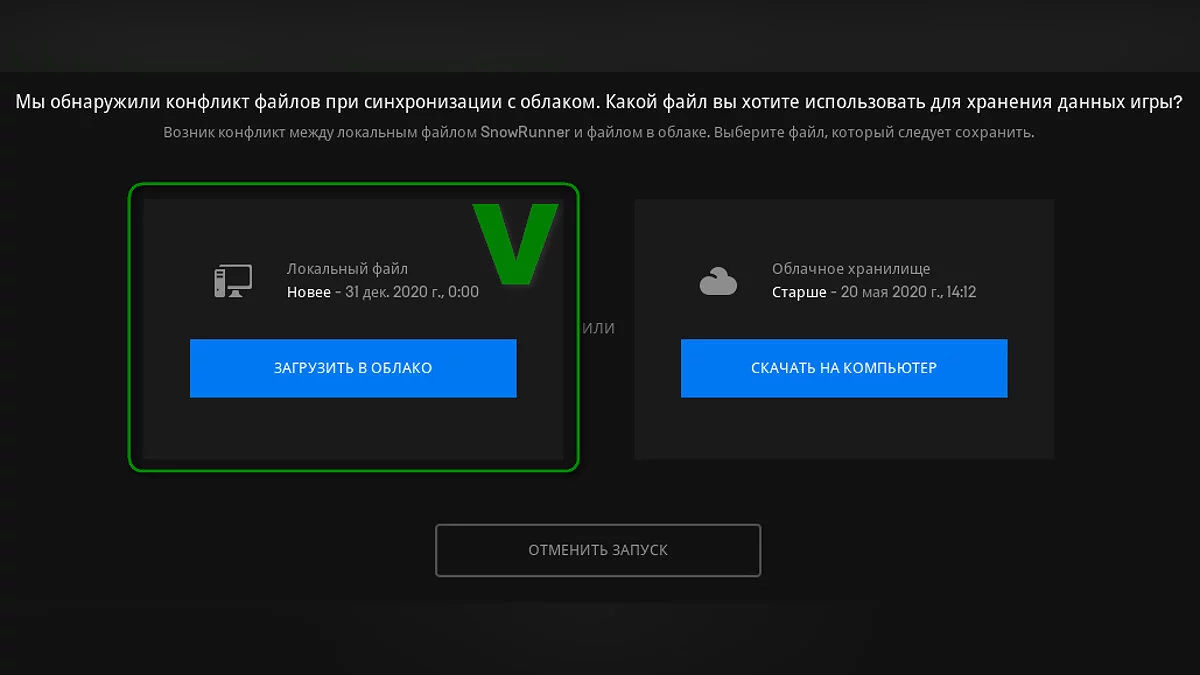
- if a prompt about different file versions appears when launching the game, select 'Upload to Cloud' (see screenshot #2).
Gearbox at Numpad.
Мод добавляет возможность переключать передачи кнопками клавиатуры без использования кнопки "Shift" и мыши.
Управление КПП (см. скриншот #1):
5 — автоматическая
6 — нейтральная
2 — задняя
8 — повышенная
4 — пониженная
7 — пониженная +
1 — пониженная -
ТОЛЬКО РУЧНАЯ УСТАНОВКА!
ВНИМАНИЕ! Мод перезаписывает файл настроек игры, изменения затрагивают разделы "ИГРА", "ИНТЕРФЕЙС", "УПРАВЛЕНИЕ" и "РУЛЕВОЕ КОЛЕСО".
После установки мода НЕ ВНОСИТЬ ИЗМЕНЕНИЯ В РАЗДЕЛЕ "РУЛЕВОЕ КОЛЕСО"!
Порядок установки:
1. Скачать данный мод.
2. Перейти в папку ..ДокументыMy GamesSnowRunnerbasestorageВАШ_ID
3. Закрыть игру и сохранить оригинальный файл "user_settings.dat"!
4. Скопировать из папки "en" или "ru" файл "user_settings.dat" в открытую папку с заменой.
ПРИМЕЧАНИЕ:
- ВАШ_ID — идентификатор вашей учетной записи, он у каждого свой (например, acfc12a4b6ba4d53a27809af754c48b6);
- в папках "en/ru" архива находятся файлы для английского/русского языка интерфейса, выбирайте тот, который вам нужен;
- если при запуске игры будет запрос о разных версиях файлов, выберите "Загрузить в облако" (см. скриншот #2).
Useful links:
![SnowRunner — Cheat Engine Table [16.0]](https://files.vgtimes.com/download/posts/2021-12/thumbs/1639212642_diesel_productv2_snowrunner_home_snowrunner_epicgames_desktop-horizontal-1360x766-1360x766-aec1e67e70958d183bff5513a80106bc1302eaa4-1360x766-c25e9f4a45c51a067598da2374e51ac4-1360x766.webp)
![SnowRunner — Cheat Engine Table [20.0]](https://files.vgtimes.com/download/posts/2022-12/thumbs/1670921641_snowrunner_screenshot_2020_05.02_-_05_32_35_50.jpg.f988c1e923d9eb997defa18079ea4e71.webp)
![SnowRunner — Cheat Engine Table [15.1]](https://files.vgtimes.com/download/posts/2021-10/thumbs/1635077601_snowrunner-title.webp)
![SnowRunner — Table for Cheat Engine [UPD: 25.03.2025]](https://files.vgtimes.com/download/posts/2025-03/thumbs/tablica-dlja-cheat-engine-upd-25-03-2025_1742889232_126543.webp)

![SnowRunner — Cheat Engine Table [24.0]](https://files.vgtimes.com/download/posts/2023-08/thumbs/tablica-dlja-cheat-engine-24-0_1690976210_726624.webp)
![SnowRunner — Cheat Engine Table [UPD: 19.11.2020]](https://files.vgtimes.com/download/posts/2020-11/thumbs/1605771123_img_20200428_151916_721_d_850.webp)
![SnowRunner — Cheat Engine Table [UPD: 01.06.2022]](https://files.vgtimes.com/download/posts/2022-06/thumbs/1654158940_h2x1_nswitch_snowrunner.webp)
![SnowRunner — Table for Cheat Engine [37.0]](https://files.vgtimes.com/download/posts/2025-06/thumbs/tablica-dlja-cheat-engine-37-0_1750320219_727976.webp)