
Spec Ops: The Line is an unusual cinematic third-person shooter that will force you to confront not only real opponents, but even your own principles. Get ready to... Read more

Enhanced Graphics

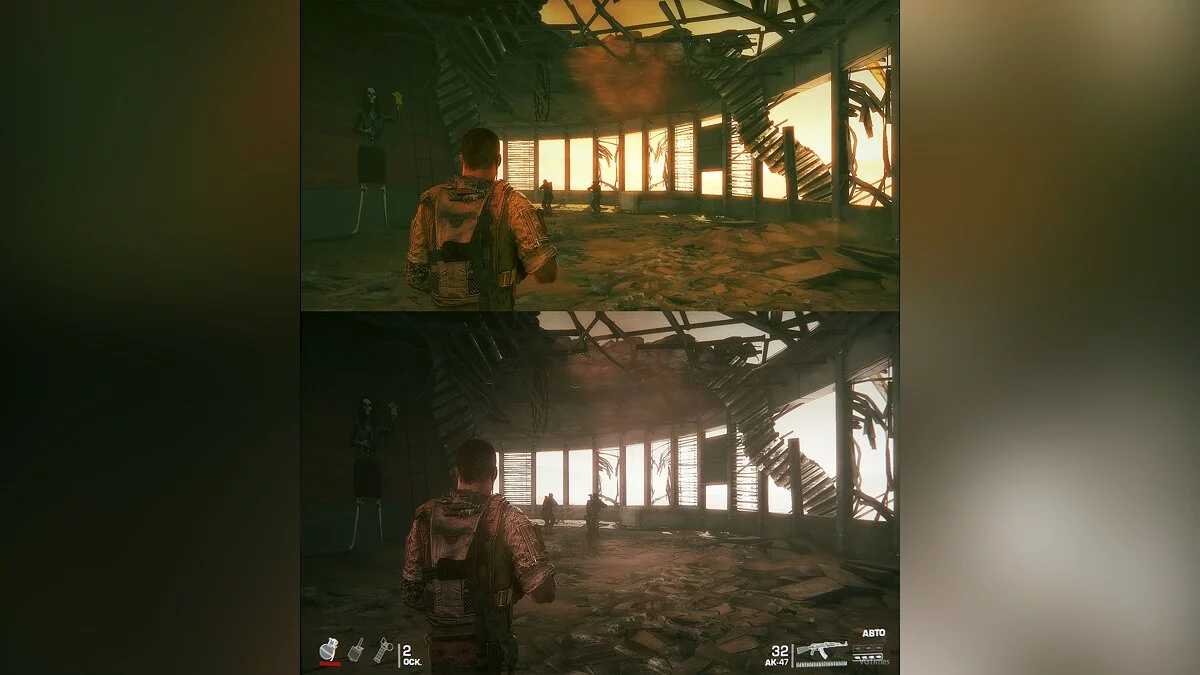
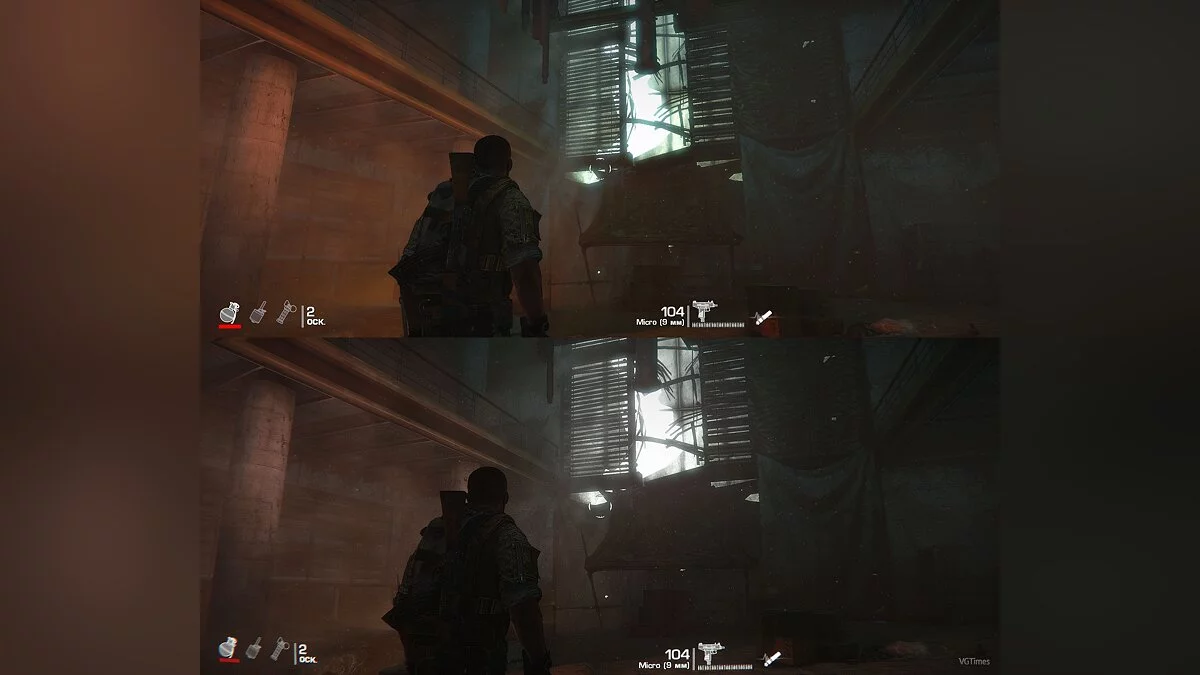
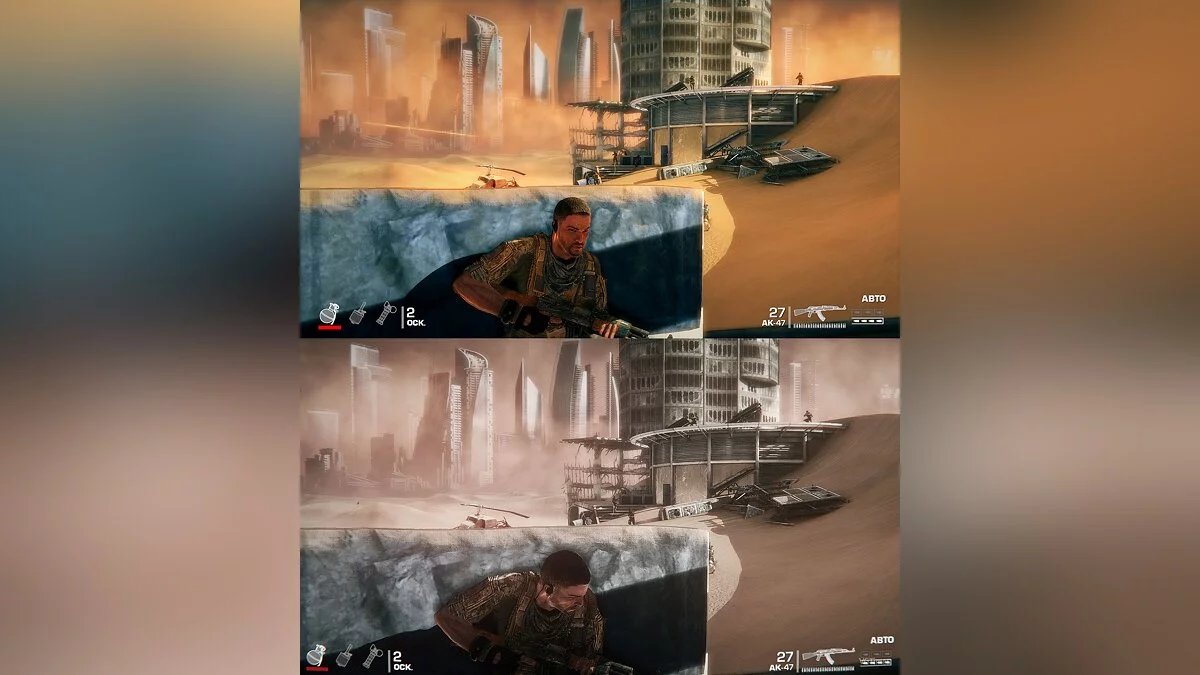

-
1566079733_w3gr_for_spec_ops.zipDownload (4.53 MB)
In my opinion, the game has excessive saturation even on the default filter. Therefore, I decided to fix this and also update the game's graphics by adding some effects.
For owners of 21:9 monitors, I also included Flawless Widescreen in the archive, which removes side bars during gameplay and changes the field of view.
Changes:
1. Changed the color and reduced saturation.
2. Added effects for a more beautiful picture.
Installation:
1. Extract the archive
2. Launch Reshade
3. Click on "Select Game" and choose the path to your game, for example, my path is: "D:\Steam\steamapps\common\SpecOps_TheLine\Binaries\Win32\SpecOpsTheLine.exe"
4. Then click on Direct3D 9
5. In the opened window click "yes"
6. Then click "ok" without unchecking the boxes.
7. Close the program.
8. Place the configuration file "SOTLBYW3.ini" in the game folder where the game is installed.
9. Launch the game
10. After loading, press Home and click "Continue" and then select the configuration file you placed in the game folder
11. Enjoy!
(further instructions for using Flawless Widescreen for 21:9 monitor owners)
12. Launch FlawlessWidescreen.exe
13. Click on Spec Ops at the top
14. After loading, enter the game and enjoy the widescreen picture.
Как по мне, в игре слишком сильная насыщенность даже на дефолтном фильтре. Поэтому, я решил исправить это и заодно немного обновить графику игры добавив некоторые эффекты.
Для обладателей 21:9 мониторов я так-же в архиве добавил Flawless Widescreen, который убирает боковые полоски при игре и меняет угол обзора.
Изменения:
1. Изменил цвет и снизил насыщенность.
2. Добавил эффектов для более красивой картинки.
Установка:
1. Распакуйте архив
2. Запустите Reshade
3. Нажмите на "Select Game" и выбираете путь до вашей игры, для примера, у меня такой путь: "D:\Steam\steamapps\common\SpecOps_TheLine\Binaries\Win32\SpecOpsTheLine.exe"
4. Потом нажмите на Direct3D 9
5. В открывшимся окне нажмите на "да"
6. Потом нажмите на "ok" не убирая галок.
7. Закройте программу.
8. Скиньте файл конфигурации "SOTLBYW3.ini" в папку с игрой, где установлена игра.
9. Запустите игру
10. После окончания загрузки нажмите на Home и нажмите на "Continue" и после этого выбирайте файл конфигурации, который вы скинули в папку с игрой
11. Enjoy!
(дальше инструкция по применению Flawless Widescreen для обладателей 21:9 монитора)
12. Запускаете FlawlessWidescreen.exe
13. Сверху нажимаете на Spec Ops
14. После загрузки заходите в игру и наслаждайтесь широкоформатной картинкой.
Useful links:
![Spec Ops: The Line — Trainer (+5) [1.0] [dr.olle]](https://files.vgtimes.com/download/posts/2017-07/thumbs/1499461515_jpg.webp)
![Spec Ops: The Line — Trainer (+5) [1.0: Updated] [dr.olle]](https://files.vgtimes.com/download/posts/2017-01/thumbs/1485292089_2012-07-05_102736.webp)
![Spec Ops: The Line — Trainer (+8) from 29.11.2021 [WeMod]](https://files.vgtimes.com/download/posts/2021-11/thumbs/1638261812_2021-11-30_114208.webp)
![Spec Ops: The Line — Trainer (+14) [Update - 2012.08.23 / 24: Steam Version] [LinGon]](https://files.vgtimes.com/download/posts/2017-01/thumbs/1485292057_2012-06-28_185302.webp)
![Spec Ops: The Line — Trainer (+4) [1.0] [HoG / sILeNt heLLsCrEAm]](https://files.vgtimes.com/download/posts/2017-07/thumbs/1499461514_jpg.webp)
![Spec Ops: The Line — Trainer (+10) [1.2] [LinGon]](https://files.vgtimes.com/download/posts/2017-01/thumbs/1485291976_2012-12-21_114002.webp)
![Spec Ops: The Line — Trainer (+2) [1.0] [Artur]](https://files.vgtimes.com/download/posts/2017-07/thumbs/1499461379_png.webp)
![Spec Ops: The Line — Trainer (+8) [1.0] [FLiNG]](https://files.vgtimes.com/download/posts/2017-07/thumbs/1499461578_jpg.webp)
![Spec Ops: The Line — Trainer (+4) [1.0.6890.0] [Abolfazl-k]](https://files.vgtimes.com/download/posts/2017-01/thumbs/1485368908_1485368897_399.webp)
![Spec Ops: The Line — Trainer (+4) [1.0.6890.0] [iNvIcTUs oRCuS / HoG]](https://files.vgtimes.com/download/posts/2017-01/thumbs/1485291979_url1.webp)