A fantasy sandbox with survival elements. You can play alone or with others, exploring the world and gathering resources, finding and raiding tombs, building bases... Read more
Ore Support

-
www.nexusmods.comDownload
Ore Support.
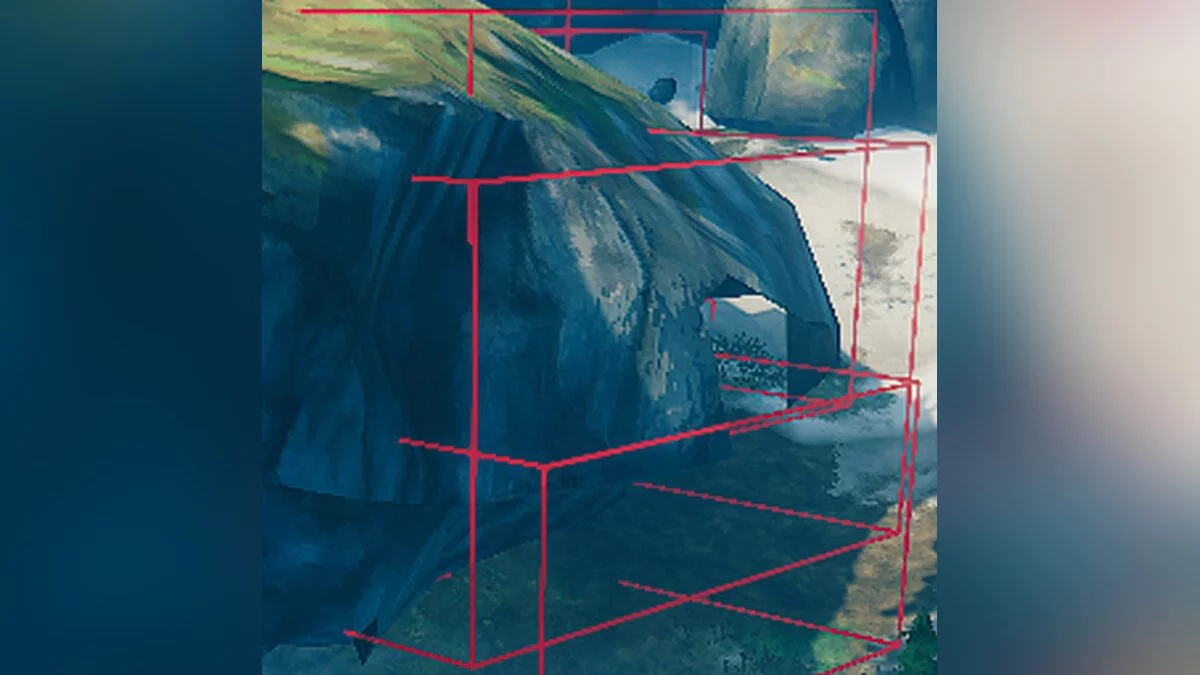
Displays supporting bounding frames for rocks, making their destruction significantly easier.
Manual Installation:
1 Install BepInExPack Valheim
2 Download the latest zip archive
3 Extract it to the folder / BepInEx / plugins /.
Instructions:
- Use / bind KEY ore_support for quick toggling of the mod by pressing a key.
- Rocks, such as copper or silver deposits, consist of several parts. These parts are automatically destroyed if they are not supported by anything.
- The game uses axis-aligned bounding boxes to check for support, making it difficult to determine which parts are preventing the collapse of the deposit.
This mod visualizes these boxes:
- Red indicates a part supported by terrain or another object.
- Orange indicates a part that collapses the deposit upon destruction.
- Green indicates that the part is no longer supported, but the game has not yet updated its state (updates only upon destruction of the part).
- Yellow indicates an object supporting the deposit.
Ore Support.
Показывает поддерживающие ограничивающие рамки для горных пород, что значительно упрощает их разрушение.
Ручная установка:
1 Установите BepInExPack Valheim
2 Загрузите последний zip-архив
3 Распакуйте его в папку / BepInEx / plugins /.
Инструкции:
- Используйте / bind KEY ore_support для быстрого включения / выключения мода нажатием клавиши.
- Горные породы, такие как месторождения меди или серебра, состоят из нескольких частей. Эти части автоматически уничтожаются, если они ничем не поддерживаются.
- В игре используются выровненные по оси ограничивающие прямоугольники для проверки опоры, что затрудняет определение того, какие части препятствуют обрушению месторождения.
Этот мод визуализирует эти коробки:
- Красный цвет указывает на часть, поддерживаемую рельефом или другим объектом.
- Оранжевым цветом обозначена часть, которая разрушает осадок при разрушении.
- Зеленый цвет указывает на то, что деталь больше не поддерживается, но игра еще не обновила свое состояние (обновляется только при уничтожении детали).
- Желтым цветом обозначен объект, поддерживающий отложение.
Related files:
Useful links:
![Valheim — Cheat Engine Table [UPD: 04.09.2022]](https://files.vgtimes.com/download/posts/2022-04/thumbs/1649844160_e195e84f125ed7d5_1920xh.webp)
![Valheim — Cheat Engine Table [UPD: 20.02.2021]](https://files.vgtimes.com/download/posts/2021-02/thumbs/1614064032_01.webp)
![Valheim — Trainer (+12) [0.139.3]](https://files.vgtimes.com/download/posts/2021-02/thumbs/1612865672_bjy0qvkacgynsmkzct7ehg.webp)
![Valheim — Cheat Engine Table [UPD: 15.02.2021]](https://files.vgtimes.com/download/posts/2021-02/thumbs/1613383293_konsolnye-komandy-dlya-admina-servera-v-valheim-74726.webp)