A classic role-playing game (CRPG) with an isometric camera, featuring interactive, immersive locations and varied gameplay. Go wherever you want, do whatever you... Read more
Candor Mod Manager - Mod Manager

-
www.nexusmods.comDownload
Candor Mod Manager.
This is an extensible mod manager that supports all games.
Installation:
1 Simply download the desired version and extract it to your preferred location.
2 Then download any of the modules you may need, such as the Baldur's Gate 3 module.
3 Open the extracted folder until you see the Candor application, create a folder named module here and place the just downloaded file inside.
4 Now you can install mods.
How to use:
Once you launch the application, it will display a list of configured games. If there are no configured games yet, you need to click the 'Load New Game' button to set up a game. Here you will select the location of the game executable file, such as the exe file, as well as the folder where the mods should be installed. There are several options here, you can choose whether to always extract mods from zip files or not.
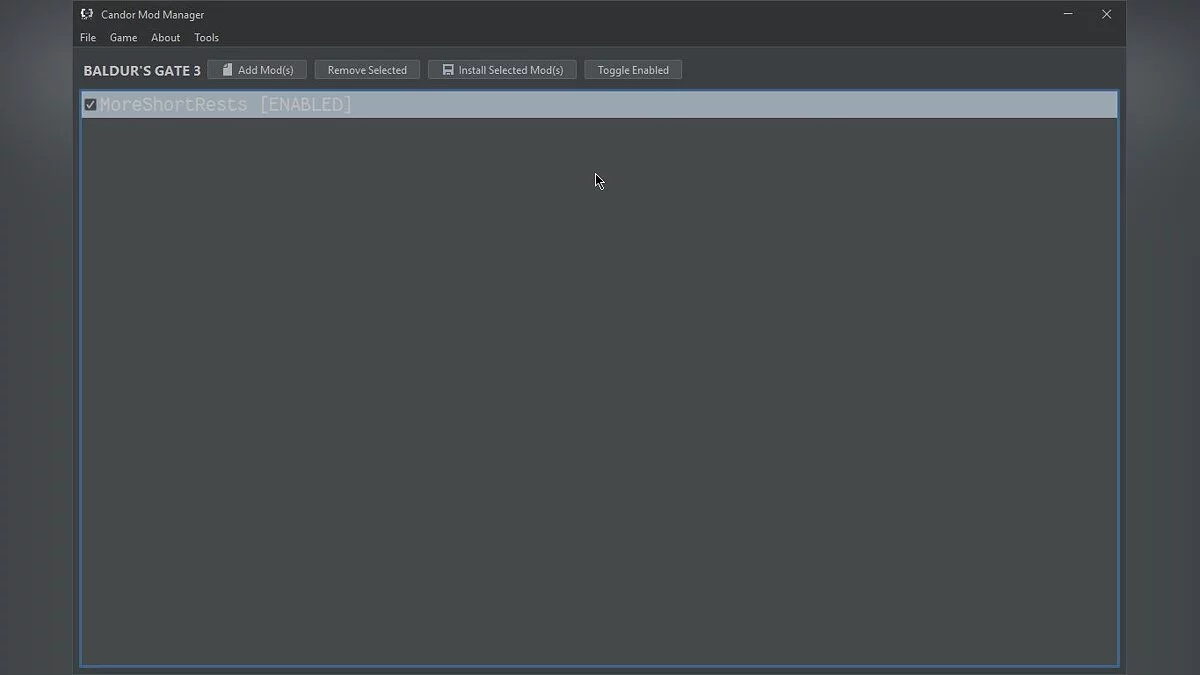
After you have configured the game and clicked the 'OK' button, you should see the main manager window, where you can click 'Add Mods' to select any mods you have downloaded and want to install. After the manager loads the mods into the list, you should highlight them and click the 'Install Mods' button, now the files will be copied to the mods folder and actually installed, then you can go to the 'Game' dropdown and click the 'Launch Game' button.
Candor Mod Manager.
Это расширяемый менеджер модов, который поддерживает все игры.
Установка:
1 Просто скачайте нужную версию и извлеките ее в желаемое место.
2 Затем загрузите любой из модулей, которые могут вам потребоваться, например, модуль Baldur's Gate 3.
3 Открывайте извлеченную папку, пока не увидите приложение Candor, создайте здесь папку под названием module и поместите туда только что загруженный файл.
4 Теперь вы можете установить моды.
Как использовать:
После того, как вы запустите приложение, оно покажет список настроенных игр. Если еще нет настроенных игр, вы должны нажать кнопку «Загрузить новую игру», чтобы настроить игру. Здесь вы выберете расположение исполняемого файла игры, например exe-файла, а также папку, в которую должны быть установлены моды. Здесь есть несколько вариантов, вы можете выбрать, всегда ли моды извлекать из zip-файл или нет.
После того, как вы настроили игру и нажали кнопку «ОК», вы должны увидеть главное окно менеджера, здесь вы можете нажать «Добавить моды», чтобы выбрать любые моды, которые вы загрузили и хотите установить, после того, как менеджер загрузит моды в список, затем вы должны выделить их и нажать кнопку «установить моды», теперь файлы будут скопированы в папку модов и фактически установлены, затем вы можете перейти в раскрывающийся список «игра» и нажать кнопку «запустить игру».
Useful links:
![Baldur's Gate 3 — Cheat Engine Table [UPDATED: 19.08.2023]](https://files.vgtimes.com/download/posts/2023-08/thumbs/tablica-dlja-cheat-engine-upd-19-08-2023_1692786023_844018.webp)
![Baldur's Gate 3 — Cheat Engine Table [UPD: 10.07.2020]](https://files.vgtimes.com/download/posts/2020-10/thumbs/1602162291_01.webp)
![Baldur's Gate 3 — Cheat Engine Table [UPD: 07.08.2023: Fixed]](https://files.vgtimes.com/download/posts/2023-08/thumbs/tablica-dlja-cheat-engine-upd-07-08_1691403759_189133.webp)
![Baldur's Gate 3 — Cheat Engine Table [UPD: 04.04.2021]](https://files.vgtimes.com/download/posts/2021-04/thumbs/1617616199_826e3d3028334259908d0fe052236f7b.webp)
![Baldur's Gate 3 — Cheat Engine Table [UPD: 30.08.2022]](https://files.vgtimes.com/download/posts/2022-08/thumbs/1661944667_ss_2441cb1e86652d4725ef44ceaf81232d601189c9.1920x1080.webp)
![Baldur's Gate 3 — Cheat Engine Table [4.1.1.2064610]](https://files.vgtimes.com/download/posts/2022-12/thumbs/1671445913_lclbs6wrpb1fymjvopqe5w.webp)
![Baldur's Gate 3 — Cheat Engine Table [UPD: 01.03.2023]](https://files.vgtimes.com/download/posts/2023-01/thumbs/1672829644_ss_9f533be1594cc4ee93b1fe549a68a9c824b42e9b.1920x1080.webp)