
A game from CD Projekt RED, the creators of The Witcher, based on Mike Pondsmith’s Cyberpunk 2020 tabletop game. The player is sent to the year 2077, where their... Read more

Settings Manager

-
www.nexusmods.comDownload
Settings Manager.
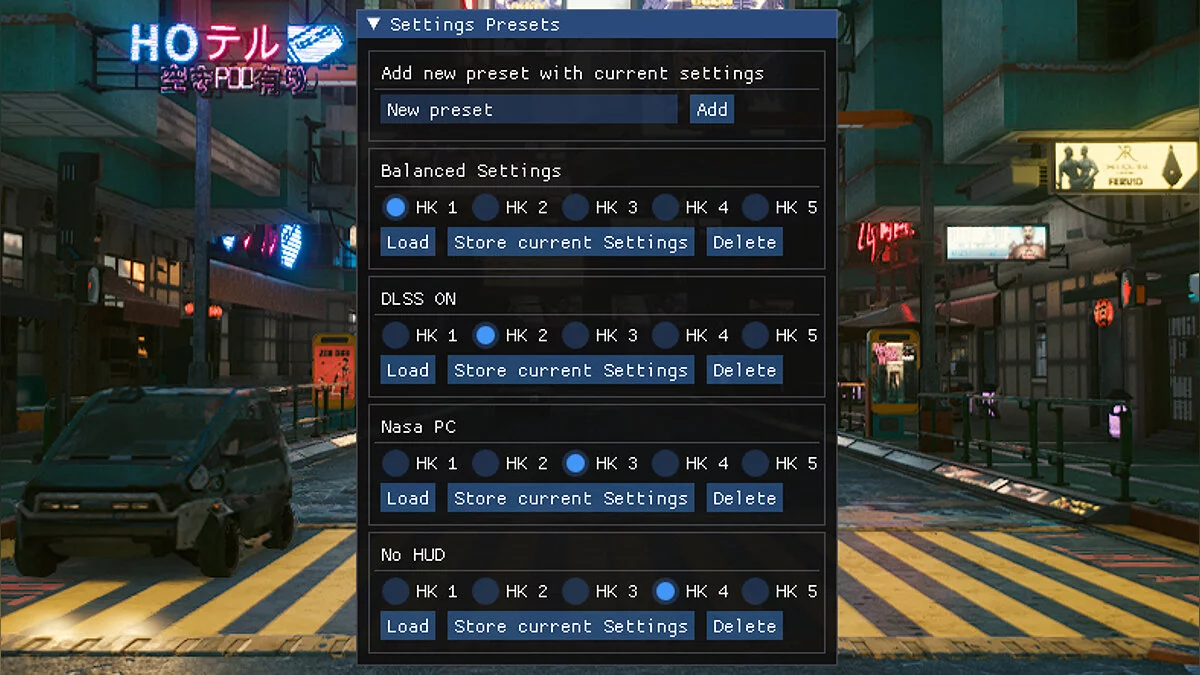
Save game settings in presets and switch between them at any time (also with hotkeys).
Installation:
1 Download and install CET
2 Download the mod
3 Extract the folder into the Cyberpunk Game folder (containing /bin and /r6).
4 The folder structure should be PATHTOCYBERPUNK/Cyberpunk2077/bin/x64/plugins/cyber_engine_tweaks/mods/presetLoader/init.lua.
5 Optional: install CPStyling for a better user interface appearance (the mod works without it)
How to use:
1 Open the CET console to display the mod interface.
2 Enter a name for your preset and click the 'Add' button next to it, this will save your current settings in a new preset.
3 Click the 'Load' button on the preset you want to load, or assign one of the five hotkeys (HK1-HK5) to the preset.
4 Click 'Save Current Settings' to save the current settings in this preset.
Settings Manager.
Сохраните настройки игры в предустановках и переключайтесь между ними в любое время (также с помощью горячих клавиш).
Установка:
1 Скачать и установить CET
2 Скачать мод
3 Распакуйте папку в папку Cyberpunk Game (содержащую / bin и / r6).
4 Структура папки должна быть PATHTOCYBERPUNK / Cyberpunk2077 / bin / x64 / plugins / cyber_engine_tweaks / mods / presetLoader / init.lua.
5 Необязательно: установите CPStyling для лучшего внешнего вида пользовательского интерфейса (мод работает и без него)
Как использовать:
1 Откройте консоль CET, чтобы отобразить пользовательский интерфейс модов.
2 Введите имя для вашего пресета и нажмите кнопку «Добавить» рядом с ним, это сохранит ваши текущие настройки в новом пресете.
3 Нажмите кнопку «Загрузить» на пресете, который вы хотите загрузить, или назначьте одну из пяти горячих клавиш (HK1-HK5) для пресета.
4 Нажмите «Сохранить текущие настройки», чтобы сохранить текущие настройки в этой предустановке.
Related files:
Useful links:
![Cyberpunk 2077 — Cheat Engine Table [UPD: 26.10.2023]](https://files.vgtimes.com/download/posts/2023-10/thumbs/tablica-dlja-cheat-engine-upd-26-10-2023_1698400056_642748.webp)

![Cyberpunk 2077 — Cheat Engine Table [2.0 - UPD: 25.09.2023]](https://files.vgtimes.com/download/posts/2023-09/thumbs/tablica-dlja-cheat-engine-2-0-upd-25-09_1695718715_491688.webp)
![Cyberpunk 2077 — Cheat Engine Table [2.0]](https://files.vgtimes.com/download/posts/2023-09/thumbs/tablica-dlja-cheat-engine-2-0_1695549003_744581.webp)
![Cyberpunk 2077 — Cheat Engine Table [1.04]](https://files.vgtimes.com/download/posts/2020-12/thumbs/1607855831_6812d4d5df1f688b1d67fa900f24e9c50ce771c8_1280_720.webp)
![Cyberpunk 2077 — Cheat Engine Table [2.01]](https://files.vgtimes.com/download/posts/2023-10/thumbs/tablica-dlja-cheat-engine-2-01_1696844855_222998.webp)