
Risen is an atmospheric action role-playing game with a third-person view in a fantasy setting from the creators of the Gothic series. In the game you have to... Read more
New High-Resolution Loading Screens
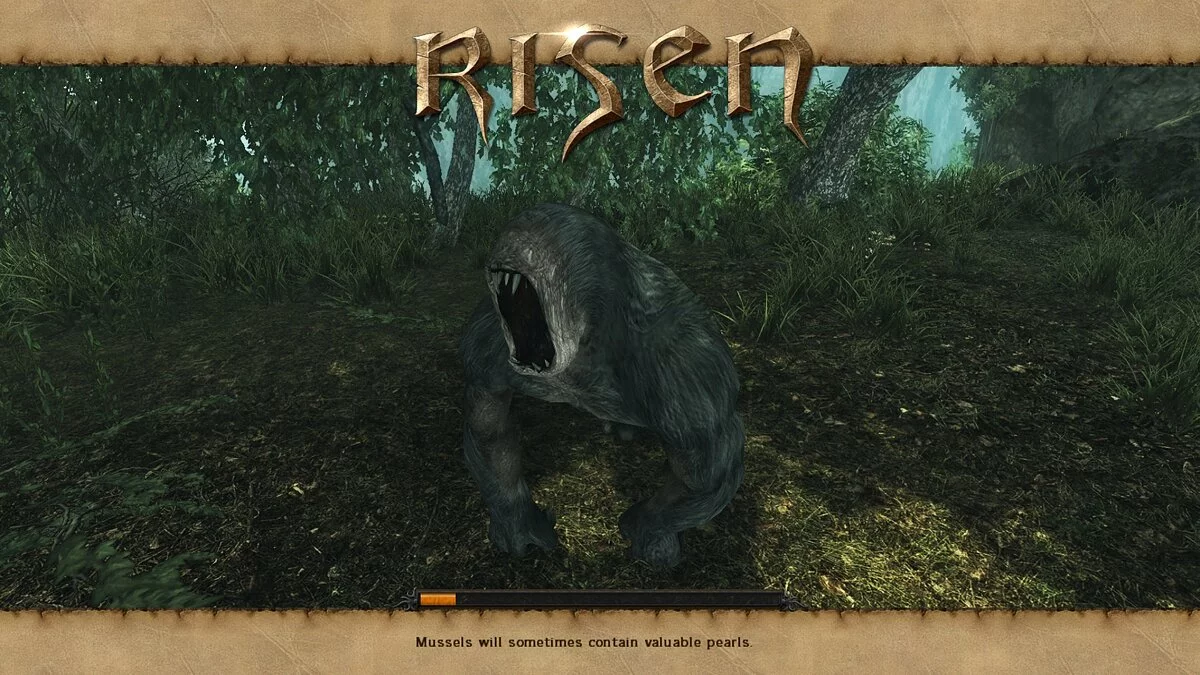

-
1662992631_new-high-resolution-loading-screens.rarDownload (74.32 MB)
This mod replaces the original low-resolution loading screens with new, professionally made high-resolution ones (2048x1024 pix). If you're new to modding Risen, you might need the Risen Mod Starter to run my mod.
Players, are you tired of looking at ugly, low-resolution loading screens?
In my opinion, loading screens play a crucial role in every computer game—they create a unique, magical atmosphere that draws us in the most...
Unfortunately, in Risen, the loading screens are low-resolution, plain, and boring... :-(((
I offer you a package of 76 professionally made high-resolution loading screens (2048x1024 pix!), which look stunning even on 29' monitors.
Installation Guide:
1. Download Risen Mod Starter:
2. Install Risen MDS on your hard drive
3. Download and unpack the mod archive
4. Place the mod archive in the RisenMDS/Fanmods/folder (the mod archive must be unpacked)
5. Launch Risen MDS and select 'New high-resolution loading screens mod'.
6. Click 'integrate mods'.
7. Once the mod is successfully integrated, you can start the game.
[thumb]https://vgtimes.ru/uploads/posts/2022-09/1662992416_1-5-1390900781.jpg[/thumb]
[thumb]https://vgtimes.ru/uploads/posts/2022-09/1662992508_1-4-1390900781.jpg[/thumb]
[thumb]https://vgtimes.ru/uploads/posts/2022-09/1662992424_1-3-1390900781.jpg[/thumb]
[thumb]https://vgtimes.ru/uploads/posts/2022-09/1662992422_1-2-1390900780.jpg[/thumb]
[thumb]https://vgtimes.ru/uploads/posts/2022-09/1662992436_1-1-1390168737.jpg[/thumb]
Этот мод заменяет оригинальные загрузочные экраны с низким разрешением на новые, с высоким разрешением (2048x1024 pix), сделанные профессионально. Если вы новичок в теме моддинга Risen, вам, вероятно, понадобится Risen Mod Starter для запуска моего мода.
Игроки — вам надоело смотреть на уродливые, низкого разрешения экраны загрузки?
На мой взгляд, загрузочные экраны играют важную роль в каждой компьютерной игре — они создают неповторимую, волшебную атмосферу игры, которая привлекает нас больше всего...
К сожалению, в Risen загрузочные экраны низкого разрешения, обычные и скучные... :-(((
Я предлагаю вам пакет из 76 профессионально сделанных загрузочных экранов высокого разрешения (2048x1024 pix !), которые выглядят потрясающе даже на 29' дюймовых мониторах.
Руководство по установке:
1. Скачайте Risen Mod Starter:
2. Установите Risen MDS на свой жесткий диск
3. Скачайте и распакуйте архив с модом
4. Поместите архив модов в папку RisenMDS/Fanmods/folder (архив модов должен быть распакован)
5. Запустите Risen MDS и выберите "New high-resolution loading screens mod".
6. Нажмите "integrate mods".
7. Когда мод успешно интегрируется, вы можете запустить игру.
[thumb]https://vgtimes.ru/uploads/posts/2022-09/1662992416_1-5-1390900781.jpg[/thumb]
[thumb]https://vgtimes.ru/uploads/posts/2022-09/1662992508_1-4-1390900781.jpg[/thumb]
[thumb]https://vgtimes.ru/uploads/posts/2022-09/1662992424_1-3-1390900781.jpg[/thumb]
[thumb]https://vgtimes.ru/uploads/posts/2022-09/1662992422_1-2-1390900780.jpg[/thumb]
[thumb]https://vgtimes.ru/uploads/posts/2022-09/1662992436_1-1-1390168737.jpg[/thumb]
Useful links:
![Risen — Trainer (+12) [1.0]](https://files.vgtimes.com/download/posts/2020-04/thumbs/1586089804_hwbozrm0xgvltiokvznykw.webp)
![Risen — Cheat Engine Table [UPD: 18.08.2022]](https://files.vgtimes.com/download/posts/2022-08/thumbs/1660908613_82559328.webp)
![Risen — Trainer (+17) [1.0.96124.0]](https://files.vgtimes.com/download/posts/2020-05/thumbs/1588768430_thxraegjid5n8w1uf3uo9q.webp)