
A role-playing action game in a pseudo-open world set in deep space, with a focus on detailed, immersive quests that offer high replayability on every playthrough... Read more
Players:
Steam:
Metacritic:
Plugins.txt Enabler
Author:
Nukem
Uploaded by:

Size:
103.92 kB
Date:
November 19, 2023, 06:42 AM
Downloads:
888
-
Download (103.92 kB)November 19, 2023, 06:42 AMДля использования с ASIplugins-txt-enabler_1700365353_444415.zip
-
Download (103.85 kB)November 19, 2023, 06:42 AMДля использования с SFSEplugins-txt-enabler_1700365353_118792.zip
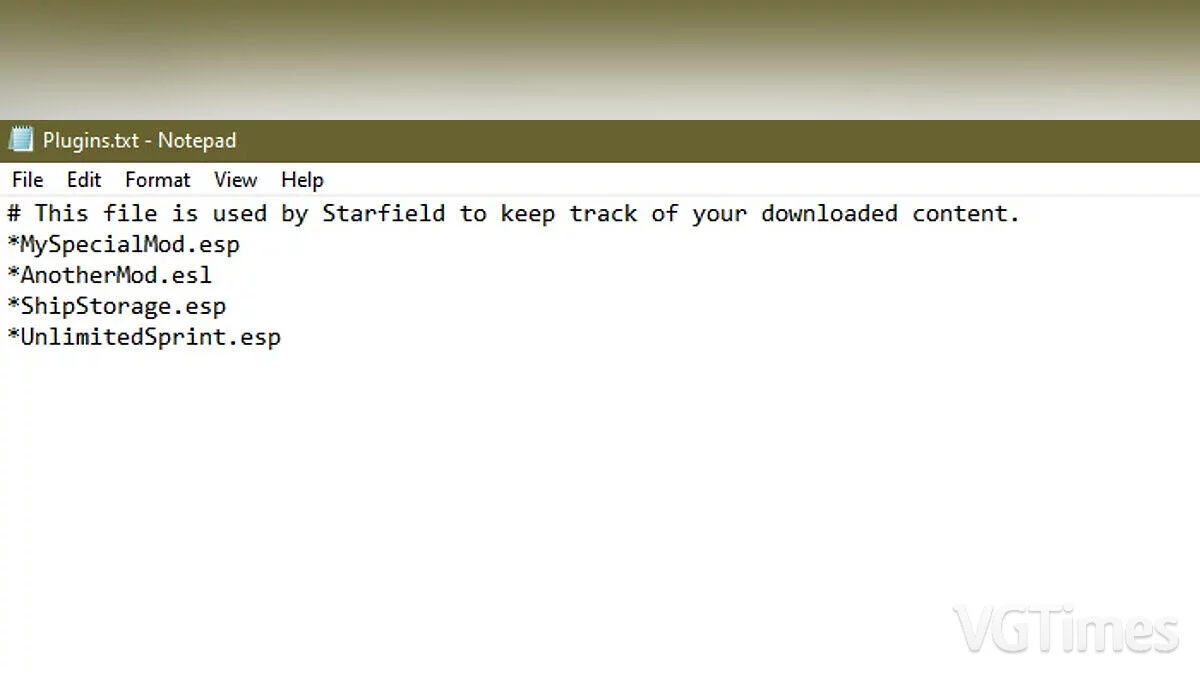
Restores the functionality of the plugins.txt file, as seen in previous BGS games. Supports Starfield Script Extender (Steam) and ASI loaders (Game Pass).
How to run:
- When manually installing SFSE, place the SFPluginsTxtEnabler.dll file in the appropriate Starfield/Data/SFSE/Plugins folder. Example path: C:/steamapps/common/Starfield/Data/SFSE/Plugins/SFPluginsTxtEnabler.dll
- When manually installing the ASI loader, place the SFPluginsTxtEnabler.asi file in the game root directory next to the Starfield.exe file. Example path: C:/XboxGames/Starfield/Content/SFPluginsTxtEnabler.asi
The file name and description have been translated Show original
(RU)Show translation
(EN)
Plugins.txt Enabler
Восстановлена функциональность файла plugins.txt, как в предыдущих играх BGS. Поддерживает Starfield Script Extender (Steam) и ASI-загрузчики (Game Pass).
Как запустить:
- При ручной установке SFSE поместить файл SFPluginsTxtEnabler.dll в соответствующую папку Starfield/Data/SFSE/Plugins. Примерный путь: C:/steamapps/common/Starfield/Data/SFSE/Plugins/SFPluginsTxtEnabler.dll
- при ручной установке ASI-загрузчика поместите файл SFPluginsTxtEnabler.asi в корневой каталог игры рядом с файлом Starfield.exe. Примерный путь: C:/XboxGames/Starfield/Content/SFPluginsTxtEnabler.asi
Related files:
Useful links:
![Starfield — Table for Cheat Engine [UPD: 21.02.2024]](https://files.vgtimes.com/download/posts/2024-02/thumbs/tablica-dlja-cheat-engine-upd-21-02-2024_1708600821_651754.webp)
![Starfield — Cheat Engine Table [UPD: 01.09.2023 Fixed]](https://files.vgtimes.com/download/posts/2023-09/thumbs/tablica-dlja-cheat-engine-upd-01-09_1694174060_480380.webp)
![Starfield — Cheat Engine Table [UPD: 09.08.2023]](https://files.vgtimes.com/download/posts/2023-09/thumbs/tablica-dlja-cheat-engine-upd-08-09-2023_1694442369_430041.webp)
![Starfield — Table for Cheat Engine [UPD: 30.05.2025]](https://files.vgtimes.com/download/posts/2025-05/thumbs/tablica-dlja-cheat-engine-upd-30-05-2025_1748680044_174132.webp)
![Starfield — Table for Cheat Engine [UPD: 18.06.2025]](https://files.vgtimes.com/download/posts/2025-06/thumbs/tablica-dlja-cheat-engine-upd-18-06-2025_1750319351_261529.webp)
![Starfield — Cheat Engine Table [UPD: 09.08.2023]](https://files.vgtimes.com/download/posts/2023-09/thumbs/tablica-dlja-cheat-engine-upd-08-09-2023_1694441160_866828.webp)
![Starfield — Table for Cheat Engine [1.15.22]](https://files.vgtimes.com/download/posts/2025-08/thumbs/tablica-dlja-cheat-engine-1-15-22_1756623903_937214.webp)