
Terraria is an adventure sandbox game with platformer elements and a side view. You will embark on a colorful journey where you can create various items, build... Read more
TModMaker - Mod Creation

-
www.nexusmods.comDownload
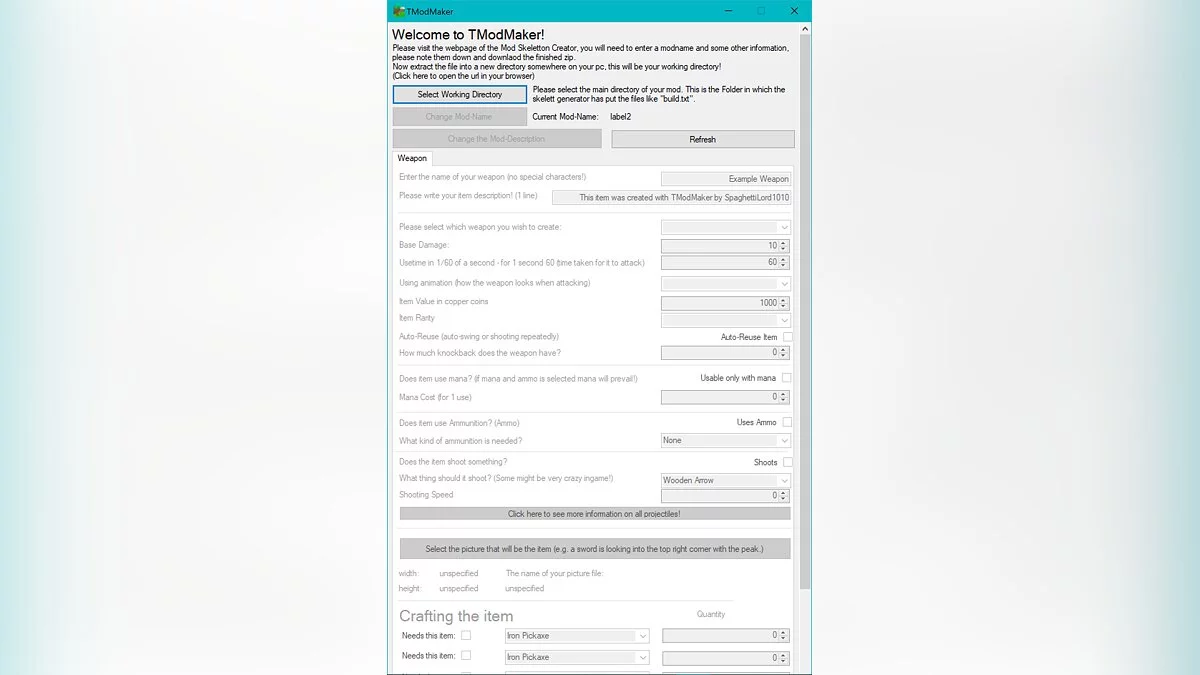
This is a tool for creating simple mods in just a few minutes.
Usage:
1. First, you will need to create a skeleton for your mod on this website: http://javid.ddns.net/tModLoader/generator/ModSkeletonGenerator.html
When you open the executable file, you will see a button to select the working directory — this is the directory where the build.txt files are located, etc. Now you can easily edit and fill in all the necessary fields. When you finish entering the information, you need to refresh and check if everything is correct — if so, you can click the button to create your file. You don't need to worry about where to place the files; everything is located correctly and should work fine.
2. Now you need to move the entire Mod folder to this location:
C: / Users / Your Username / Documents / My Games / Terraria / ModLoader / Mod Sources
The folder may not exist yet; if so, just create it. Now you can open TerrariaModLoader and notice a new menu item: click on "Mod Sources," and your mod should be in this folder! Click the button: Build and Refresh, and your mod will work!
Это инструмент для создания простых модов в считанные минуты.
Использование:
1. сначала вам нужно будет создать скелет для вашего мода на этом сайте: http://javid.ddns.net/tModLoader/generator/ModSkeletonGenerator.html
При открытии исполняемого файла вы увидите кнопку выбора рабочего каталога — это каталог, в котором расположены файлы build.txt и т. д. Теперь вы можете легко редактировать и заполнять все необходимые поля. Когда вы закончите вносить информацию, вам нужно обновить и проверить, все ли правильно — если это так, вы можете нажать кнопку, чтобы создать свой файл. Вам не нужно беспокоиться о том, куда закинуть файлы, все расположено правильно, и должно работать нормально.
2. Теперь вам нужно переместить всю папку Mod в эту папку:
C: / Users / Ваше имя пользователя / Documents / Мои игры / Terraria / ModLoader / Mod Sources
Папка может еще не существовать, если это так, просто создайте ее. Теперь вы можете открыть TerrariaModLoader и заметить новый пункт меню: нажмите «Mod Sources», и в этой папке должен быть ваш мод! Нажмите на кнопку: Build and Refresh, и ваш мод заработает!
Useful links:
![Terraria — Cheat Engine Table [1.4.4.2 AMD Fixed 5]](https://files.vgtimes.com/download/posts/2022-10/thumbs/1665138090_0e187227ad1aa3b04dee396a55a09b36.webp)
![Terraria — Cheat Engine Table [1.4.3.2/Intel]](https://files.vgtimes.com/download/posts/2021-12/thumbs/1638352897_si_wiiu_3ds_terraria.webp)
![Terraria — Cheat Engine Table [1.4.3.6: Intel #4]](https://files.vgtimes.com/download/posts/2022-03/thumbs/1646816204_6896.webp)
![Terraria — Cheat Engine Table [UPD: 18.10.2022 / Intel]](https://files.vgtimes.com/download/posts/2022-10/thumbs/1666174408_rtajuexp.webp)
![Terraria — Cheat Engine Table [UPD: 05.18.2021/1.4.2.3]](https://files.vgtimes.com/download/posts/2021-05/thumbs/1621427474_sm.1.750.webp)
![Terraria — Cheat Engine Table [UPD: 06.09.20 / 1.4.0.5]](https://files.vgtimes.com/download/posts/2020-06/thumbs/1591791566_zu9gmqfyj-umpv4uwr2s3a.webp)
![Terraria — Cheat Engine Table [1.4.3/Intel]](https://files.vgtimes.com/download/posts/2021-11/thumbs/1637659484_si_wiiu_3ds_terraria.webp)
![Terraria — Cheat Engine Table [UPD: 19.05.20 / 1.4]](https://files.vgtimes.com/download/posts/2020-05/thumbs/1589976643_wyc5dowhzv6bmhtcof_e-a.webp)
![Terraria — Cheat Engine Table [UPD: 06.05.20 / 1.4.0.5]](https://files.vgtimes.com/download/posts/2020-06/thumbs/1591446045_eejwjfirjcfe_szlfq0tnw.webp)
![Terraria — Cheat Engine Table [1.4.3.6/Intel]](https://files.vgtimes.com/download/posts/2022-05/thumbs/1653985975_b7c65e77a5f126a1024a8459ec0fd08f.webp)