
How to Install Skyrim Together Reborn: Mod Setup with Vortex, Server Creation, and Fixing Errors
 Vladyslav Shamshurov
How to install Skyrim Together Reborn and play Skyrim in co-op — a step-by-step guide on setting up the mod with Vortex, creating a server, and fixing errors for Skyrim SE 1.6+.
Skyrim Together Reborn is the current version of the co-op mod for The Elder Scrolls 5: Skyrim Special Edition. Unlike the original Skyrim Together, Reborn synchronizes quests, enemies, inventory, and most in-game events for up to 8 players at once. In this guide, you’ll learn how to install Skyrim Together Reborn using the Vortex mod manager, how to set up a private server with Hamachi, and how to fix the most common launch errors.
What is Skyrim Together Reborn. Main Features and Limitations
Skyrim Together Reborn is a reworked version of the Skyrim Together mod, fixing the main issues of the original. Now, quests, puzzles, loot from enemies, and most in-game events are fully synchronized. The server supports up to 8 players at the same time.
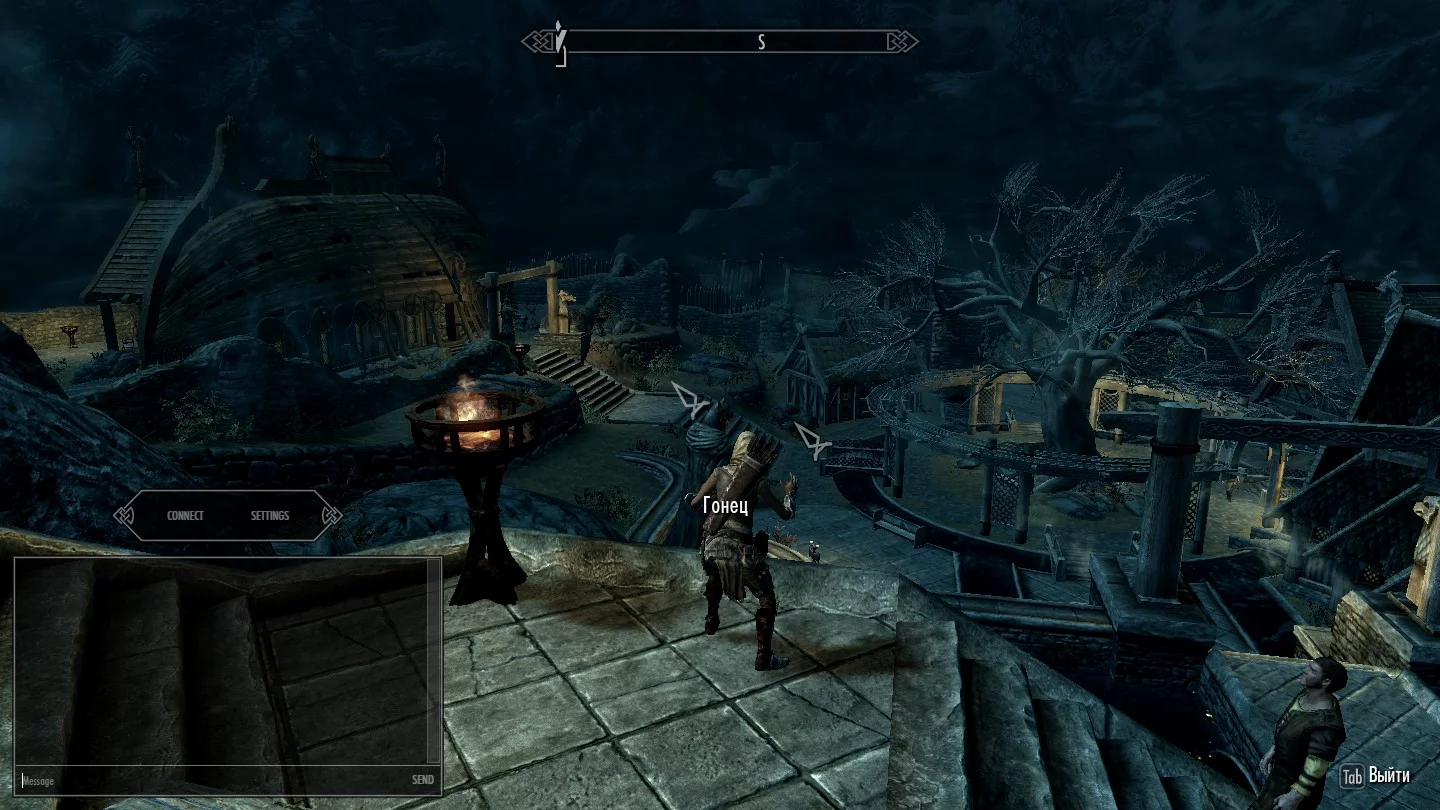
Mod Features
- NPCs and enemies. All NPCs and enemies are fully synchronized: animations, health, and behavior are the same for everyone.
- Quests and dialogues. Quests are automatically synced to the server owner. The chosen dialogue answer is shown to all party members in the lower left corner.
- Inventory and items. Players share loot from enemies, items in chests, and gear.
- Player death. After dying, the character respawns near the place of death without losing items. If you die in a city, all charges are cleared automatically.
- Difficulty and PvP. The server owner can change the difficulty level and enable PvP using console commands.
Additional features are also synchronized: pickpocketing, magic and arrows, locks, horses, puzzles, stealth.
Known Limitations
- Followers. The developers do not recommend hiring companions, as this may cause bugs.
- Other mods. The authors warn that using additional mods may cause instability.
- Weather. Only clear weather is available for all players.
- Public servers. Public servers often have bugs that can break story progression. Private servers are recommended.
Which Skyrim Version Do You Need for Skyrim Together Reborn
The mod is compatible with the following versions of the game:
- The Elder Scrolls 5: Skyrim Special Edition (patch 1.6 and above)
- The Elder Scrolls 5: Skyrim Anniversary Edition (1.6.353)
Versions 1.5.97, 1.5.93, and below are not supported. Check your game version before installing. If you have 1.5.97 or 1.5.93, it’s likely you intentionally skipped updates; you can update the game anytime through Steam.
How to Install Skyrim Together Reborn with Vortex. Step-by-Step Guide
Manual installation can cause a lot of errors, so it’s best to use the Vortex mod manager.
Register on Nexus Mods. Download and install Vortex. Log into your account in the app, open Settings — Language, and select Russian if you prefer.
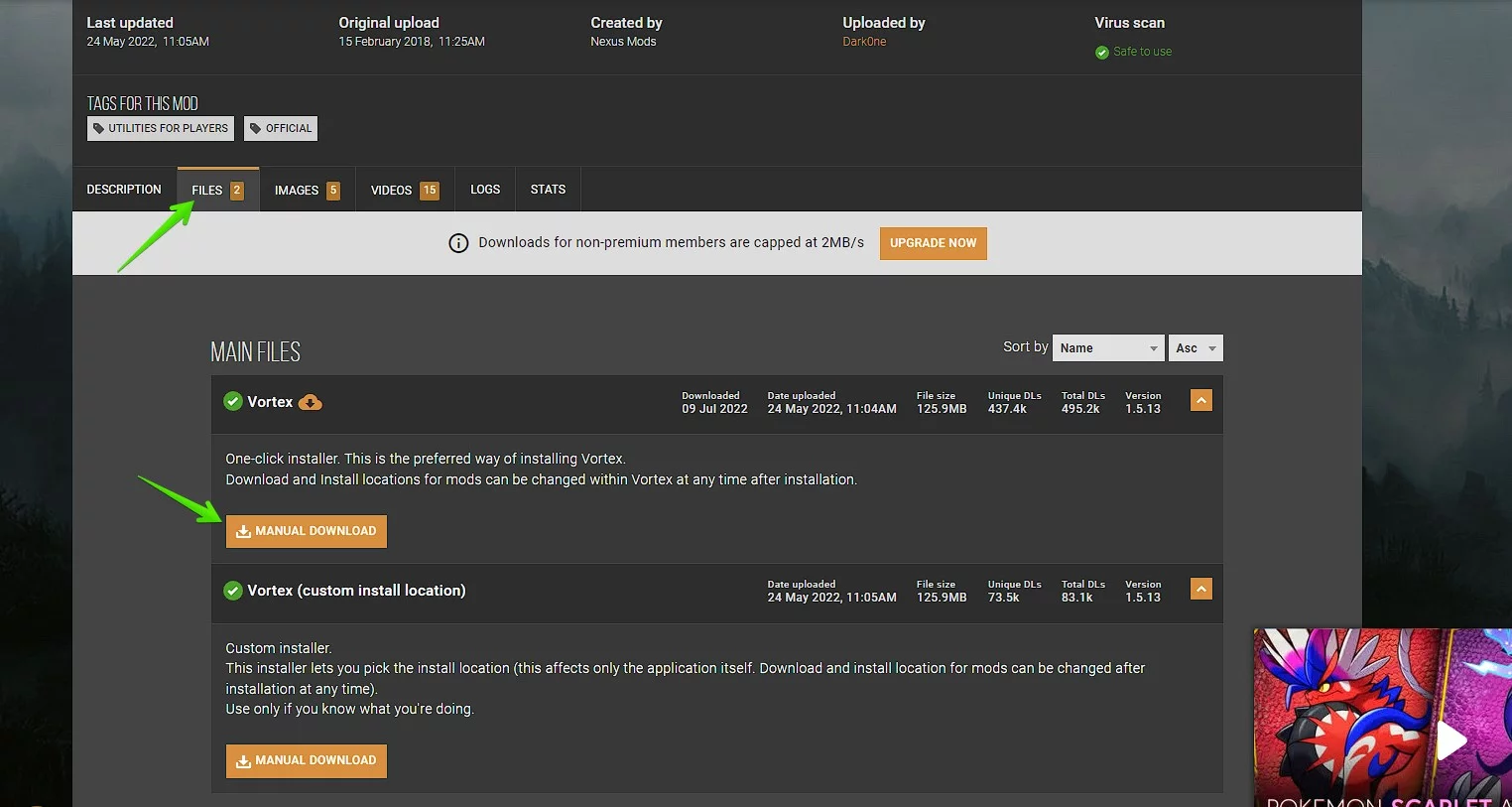
Go to the Games section and add Skyrim Special Edition to your list.

Step 1. Install SKSE
Download the SKSE script extender from the official website. Make sure you choose the right version for your game — we recommend downloading SKSE for Anniversary Edition (1.6.353), even if you have version 1.6 or above.
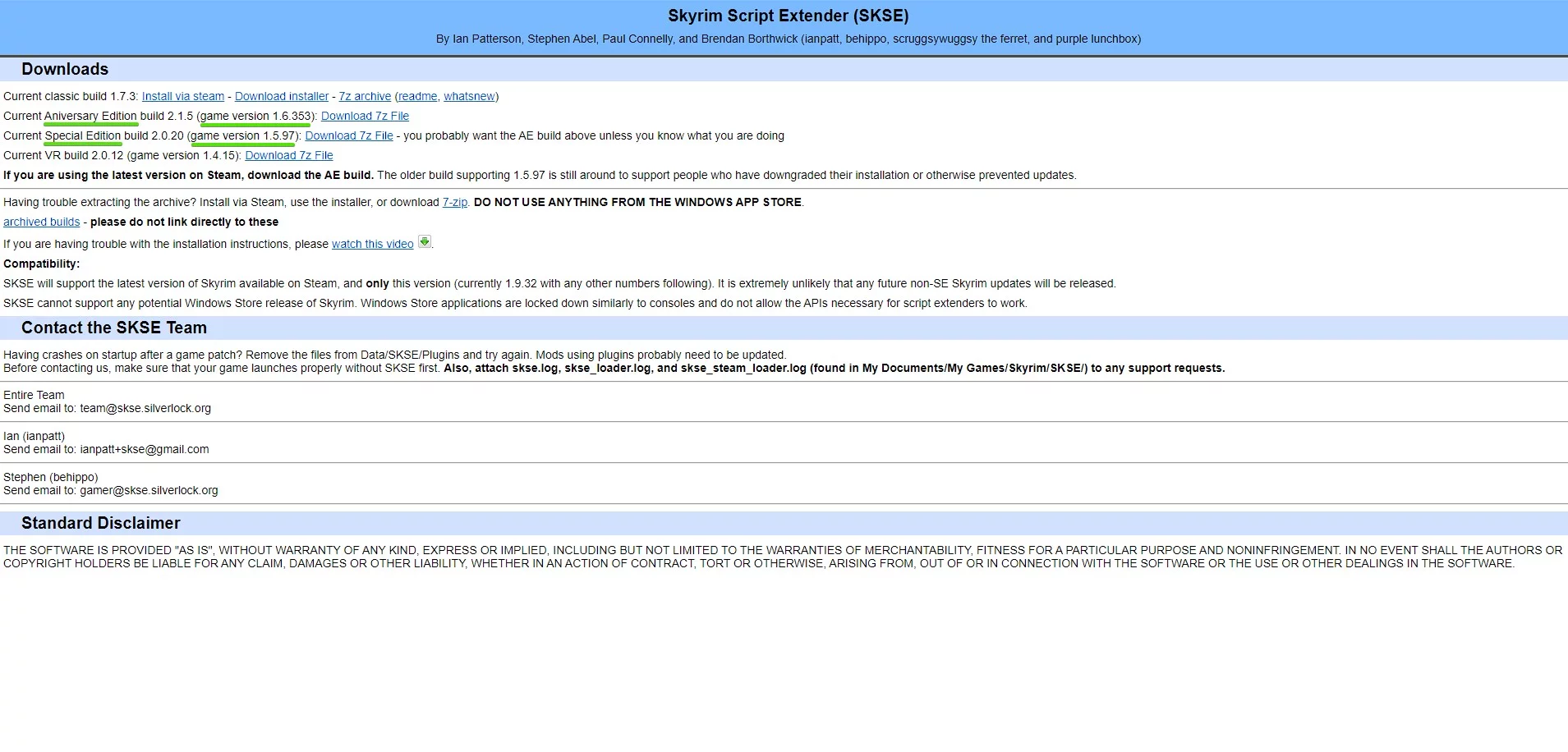
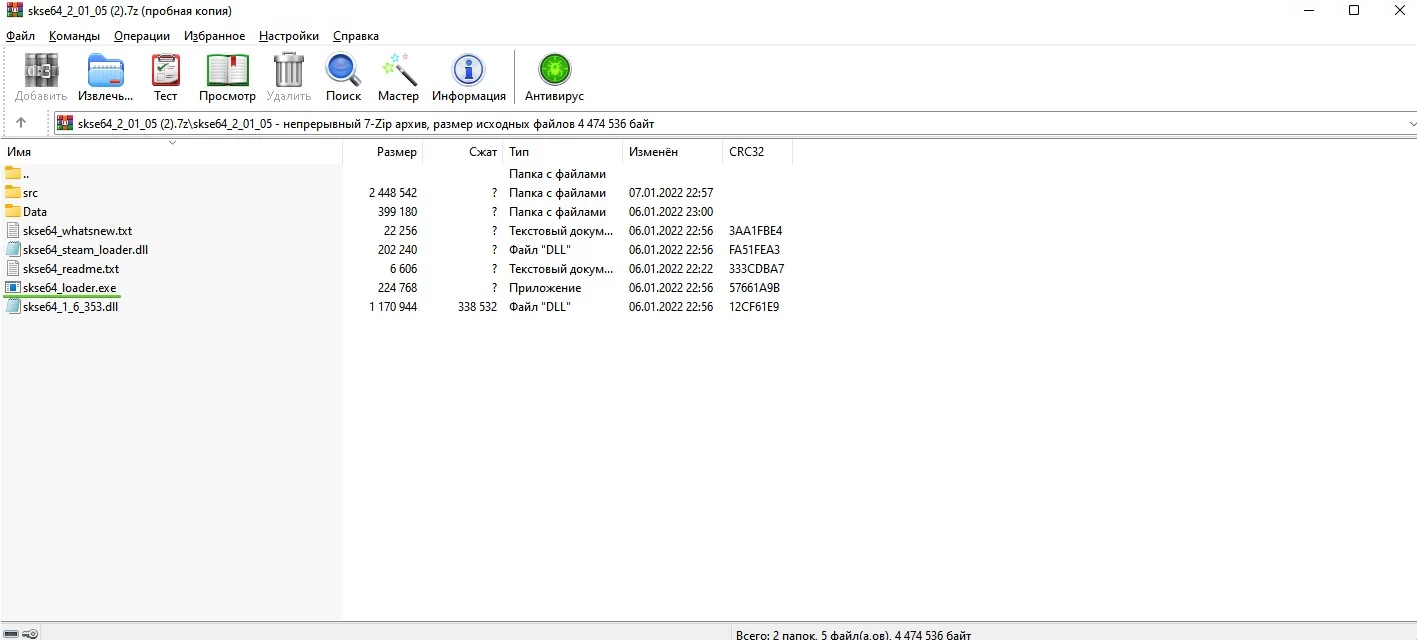
Extract the archive contents to your main Skyrim folder and run skse64_loader.exe.
Step 2. Install Address Library for SKSE Plugins
Go to the mod page and download the version you need:
- All in one (Anniversary Edition) — for Skyrim Anniversary Edition (1.6.353)
- All in one (Special Edition) — for Skyrim Special Edition (1.6 and above)
Click Mod Manager Download — the download will automatically start in Vortex.
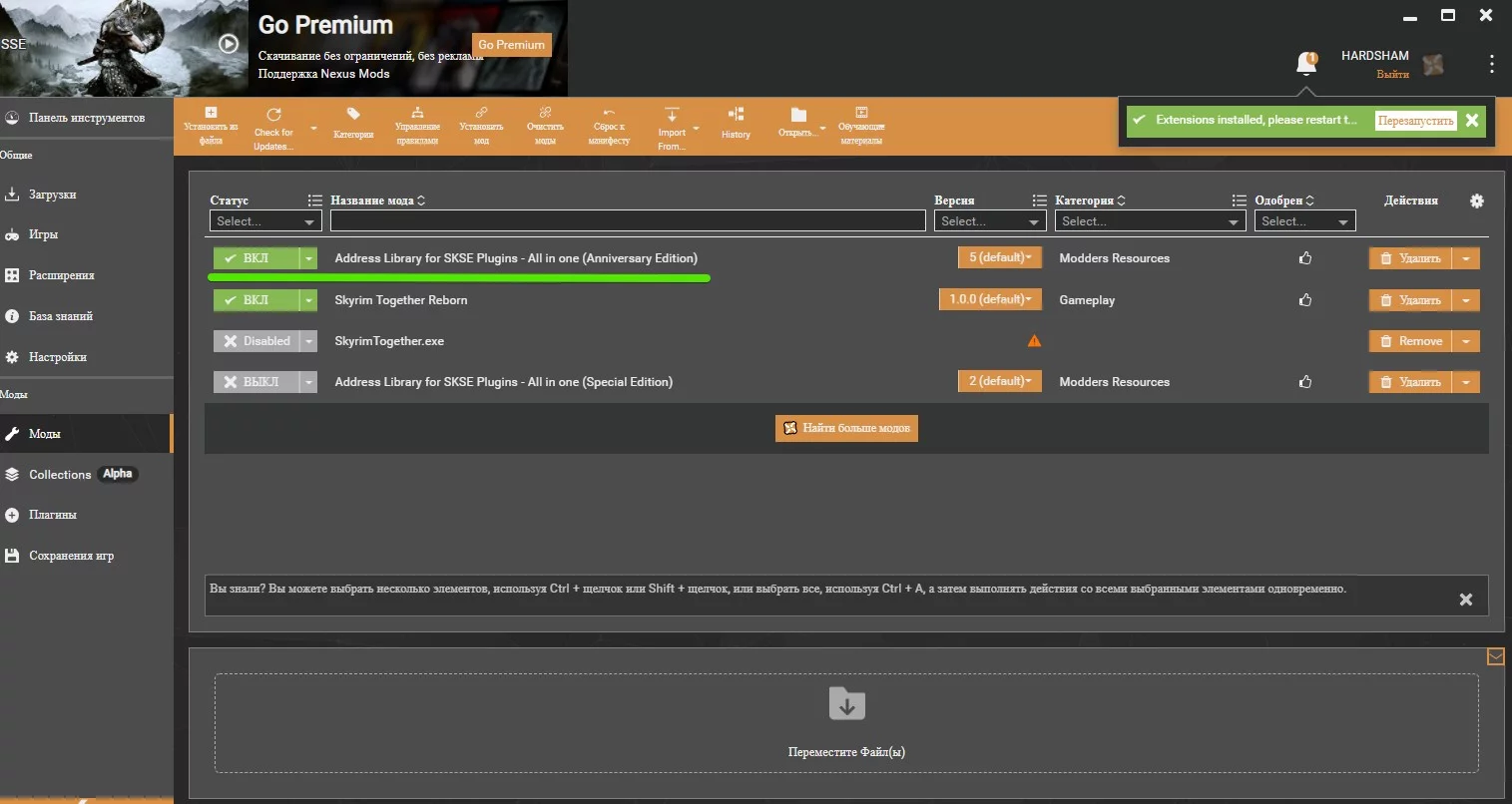
Step 3. Install Skyrim Together Reborn
Open the mod page on Nexus Mods and select Mod Manager Download. Vortex will download and install the mod automatically.
How to Launch Skyrim Together Reborn
Once all three components are installed, you just need to set up the launch in Vortex.
Go to the Dashboard and click Add Tool. In the Target field, enter the path to SkyrimTogether.exe in the mod folder and click Save.
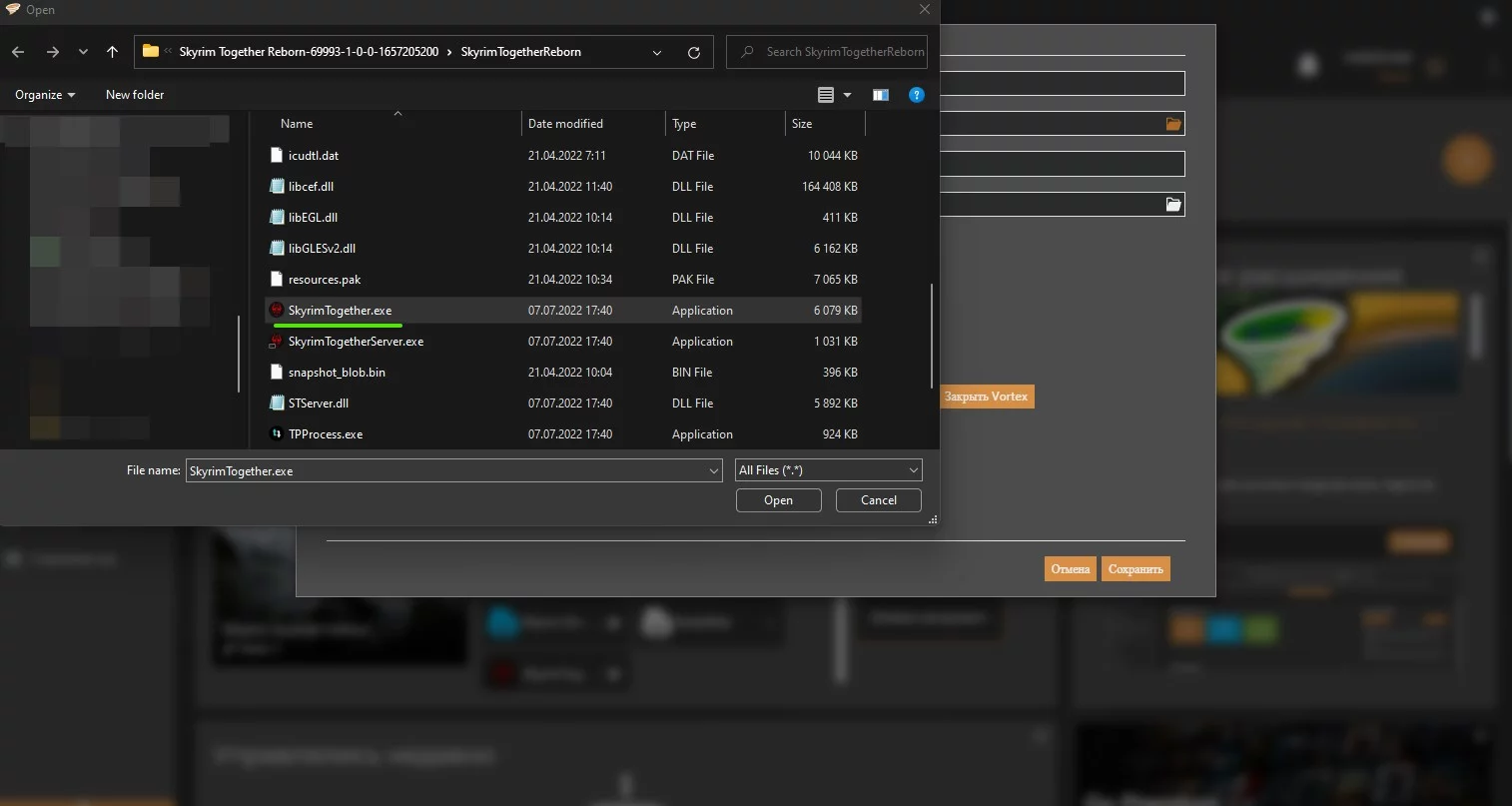
To find the mod folder: open the Mods section in Vortex — right-click Skyrim Together Reborn — select “Open in File Manager.”
You’ll now see Skyrim Together on your dashboard. Click Play — the first time you launch, the mod will ask you to point to SkyrimSE.exe. You can find it through Steam: right-click the game — “Manage” — “Browse local files.”
Errors When Installing Skyrim Together Reborn. How to Fix Failed to load Skyrim Address Library and Wrong game selection
When installing mods, you might run into a few common issues. Here are the most up-to-date solutions.
Failed to load Skyrim Address Library
This is the most frequent error. It usually happens for two reasons:
- Your game version does not match the version of the SKSE script extender.
- The version of Address Library for SKSE Plugins does not match your game build.
Skyrim Together Reborn does not work with patches below 1.6.x or with VR 2.0.12 (1.4.15). There’s no point in trying to install the mod on those versions.
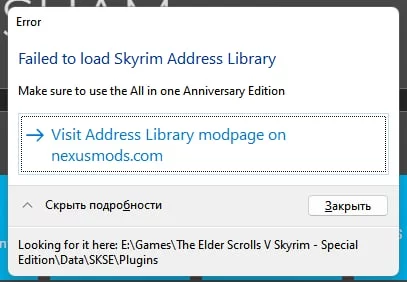
Skyrim 1.5
If you have a downgrade patch active, check your files through Steam: library — right-click the game — “Properties” — “Local Files” — “Verify integrity of game files.”
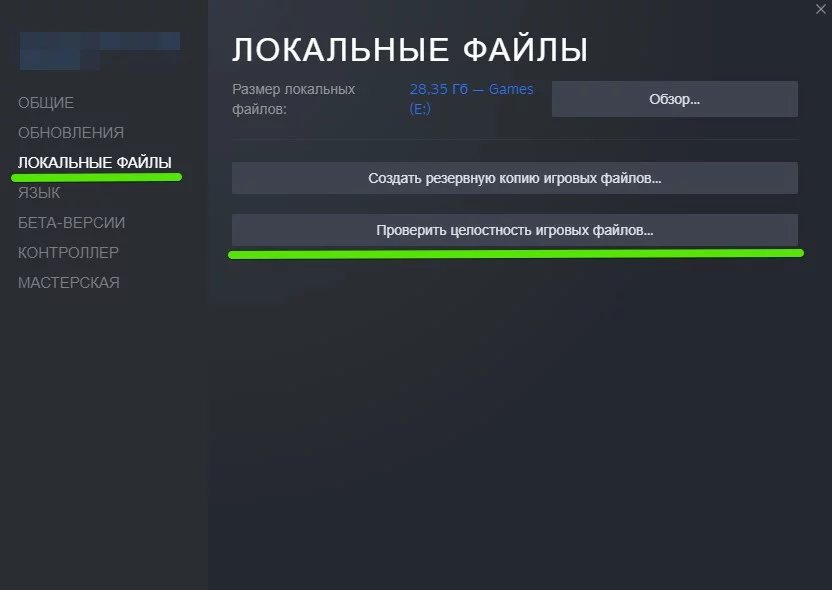
Wrong game selection
This error means the wrong file was chosen during the first launch. Here’s how to fix it:
- Open the mod folder.
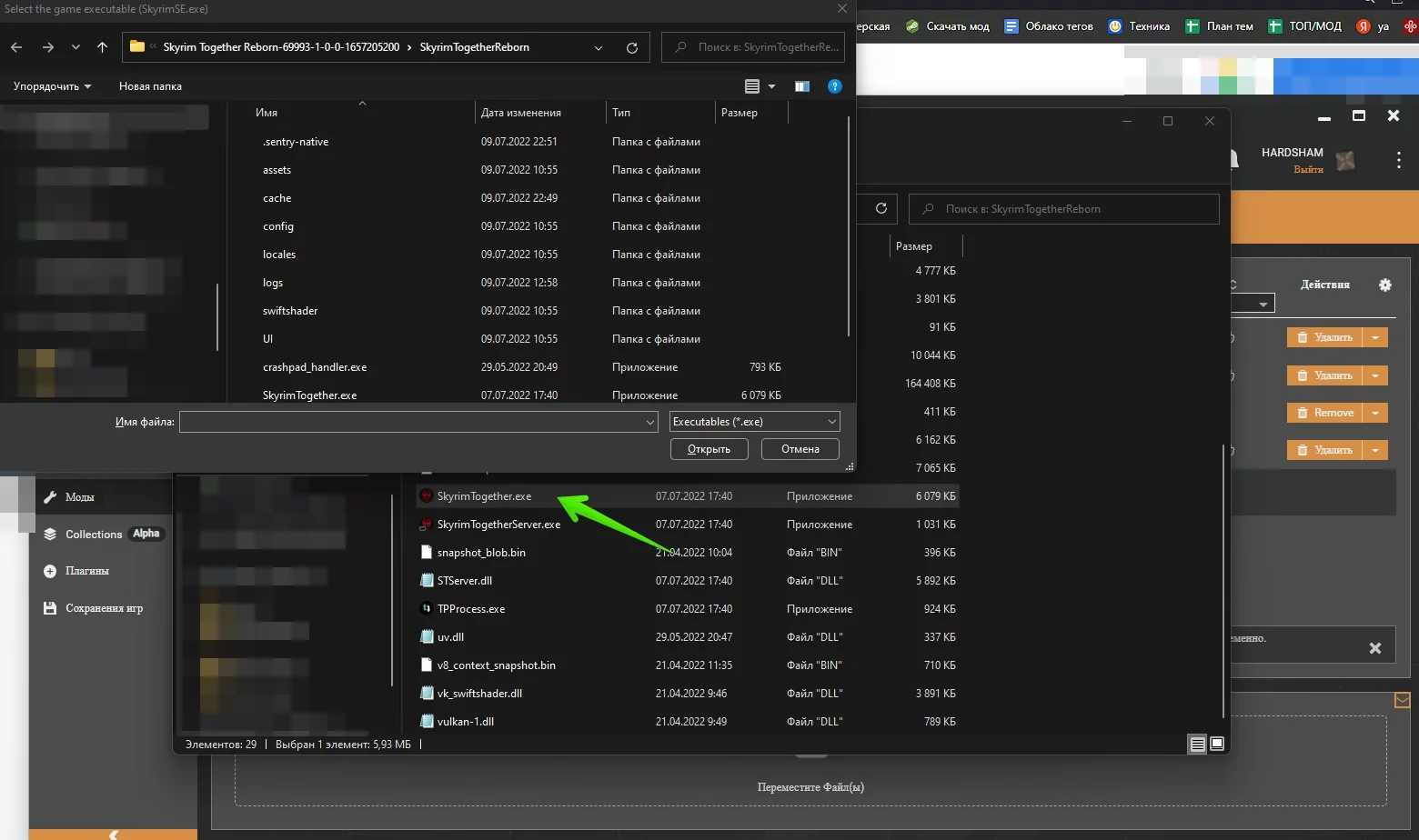
- Hold Space and double-click SkyrimTogether.exe.
- Select the correct SkyrimSE.exe file.
How to Play Skyrim Together. Creating a Server and Connecting to a Friend
Important: To avoid desync during the first quest “Unbound,” all players should follow the same NPC — either Hadvar or Ralof.
Playing on Public Servers
- Start the game and load your save.
- Press RCtrl or F2.
- Choose Connect — Public Servers.
- Pick any available server and click Connect.
Most public servers are unstable. For story progression, it’s best to create a private server.
Creating a Private Server
- Download Hamachi and create a network.
- Copy the IP address of your network.
- Find the mod folder and run SkyrimTogetherServer.exe.
- Open the game, press RCtrl / F2 — Connect.
- Paste the IP and add :10578 — for example, 25.33.250.202:10578.
- Set a server password if you want.
- Click Connect.
Connecting to a Friend’s Private Server
- Join the Hamachi network and copy the IP.
- Open the game — RCtrl / F2 — Connect.
- Paste the IP with :10578 at the end.
- Enter the password if there is one.
Server Console Commands
- /help — list of commands
- /set — set a parameter (true / false)
- /TogglePvP — turn PvP on or off (off by default)
- /TogglePremium — switch Premium mode
- /players — list of players on the server
- /mods — list of installed mods
- /version — server version
- /quit — stop the server
Frequently Asked Questions about Skyrim Together Reborn
How is Skyrim Together Reborn different from the original Skyrim Together?
Reborn is a completely reworked version of the mod. Unlike the original, it synchronizes quests, puzzles, enemy loot, and weather. Installation goes through Vortex instead of the old Harbor launcher. Up to 8 players are supported, compared to the unstable multiplayer in the previous version.
Which Skyrim version do you need for Skyrim Together Reborn?
Skyrim Special Edition 1.6+ or Skyrim Anniversary Edition 1.6.353. Versions 1.5.97 and below are not supported.
How many players does Skyrim Together Reborn support?
Up to 8 players on one server. For a stable experience and to play through the story, private servers are recommended — public servers are often unstable.
Does Skyrim Together Reborn work with other mods?
Most popular mods are compatible as long as all players have the same load order. Mods that change scripts or physics can cause desync — you’ll need to test those separately.
Can you get banned for using Skyrim Together Reborn?
No. Skyrim SE does not have an aggressive anti-cheat system for single player. The mod does not interact with Bethesda servers.
Can you install Skyrim Together Reborn without Vortex?
The mod creators do not recommend manual installation because it often leads to errors. If you still want to install it manually, follow the instructions on the mod page on Nexus Mods — there is a section for Manual Installation.
Were you able to get Skyrim Together Reborn running? Share your experience in the comments — who did you play with and how far did you get in co-op Skyrim?
Other guides


-
 Is Oblivion a Rehearsal? Todd Howard Hints The Elder Scrolls 6 Could Drop Without Warning
 -
 While we wait for TES 6, Todd Howard is shutting down the mobile game The Elder Scrolls: Blades
 -
 It won't be like The Elder Scrolls 6: Stellar Blade 2 developers have stated that they are not announcing the game prematurely
 -
 “They packed the boxes themselves”: how Bethesda released the first The Elder Scrolls almost by hand
 -
 “The early days of The Elder Scrolls and Fallout were the same”: Todd Howard defends Starfield from criticism